Converter vídeo Ultimate
 100% seguro. Sem anúncios.
It is no longer a big need for AVI para AMV conversões.
AMV is a stripped-down format built for old hardware, such as low-cost portable MP4 players and S1 MP3 players. Those budget players often have tiny screens to handle low resolution and small file sizes. When you put an AVI file into a player, you often get a “format not supported” error. Sometimes, your device simply can’t decode it. The truth is, the old player only recognizes specific file types like AMV. That’s why converting AVI to AMV is a real problem you have to solve.
AMV é um anagrama para Action Media Video, a proprietary format made specifically for low-cost portable MP4 players. Technically, its container is a modified version of AVI, and its video codec is a variant of Motion JPEG. You can think of AMV as a certain version of AVI. AMV files are designed for weak, low-power devices to decode video without choking.
Why bother converting AVI to AMV?
AVI to AMV conversion still matters for one certain case: legacy MP4 players. You must convert because the AVI file(s) can’t be played on your player. As mentioned, those old devices only recognize specific file types like AMV. You need to make the conversion for playback.
Many related video conversion tools are available to help you convert AVI to AMV. This section recommends 2 top contenders. You can compare them and pick your preferred one.
Aiseesoft Video Converter Ultimate is an ideal choice if you want a dedicated desktop tool that provides all the necessary conversion, editing, and enhancement tools. The software provides a straightforward way to convert AVI to AMV or another format you want. You can add your AVI files, set AMV as the target format, and then start converting.
100% seguro. Sem anúncios.
100% seguro. Sem anúncios.
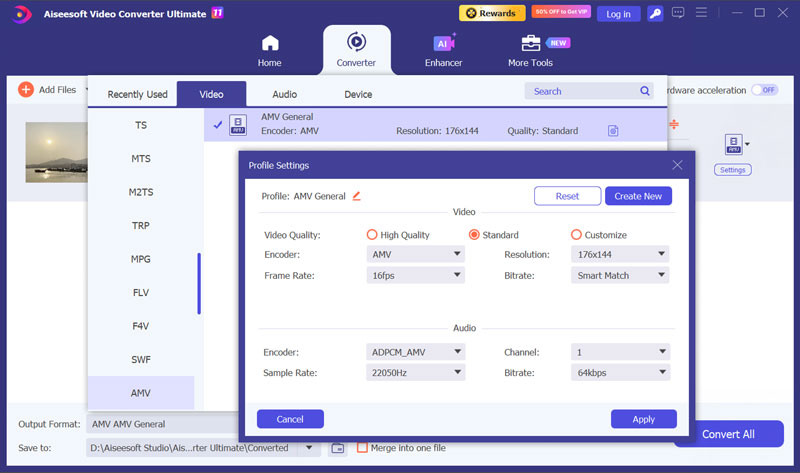
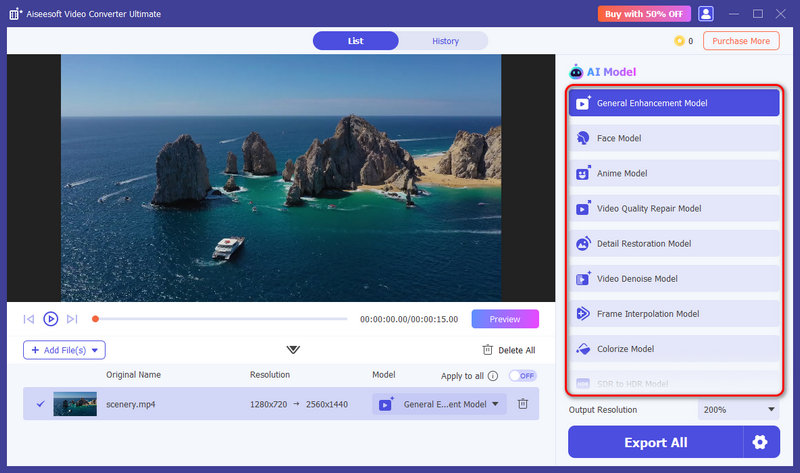
This AVI to AMV converter provides upscaling and enhancement features. You can apply desired AI models to improve the output quality. If you often convert or edit videos, the software should be your first choice, considering its intuitive interface, broad format support, powerful functions, and stable performance. Surely, if you only convert a file or two occasionally, start with a free online tool in the next part.
Many online tools can help you directly convert videos in your browser. However, when it comes to converting AVI to AMV, only a few are left to do that. One popular choice is Conversor M. Tem um indivíduo Convert AVI to AMV page for you to handle multiple AVI files in bulk. You can upload sources from your device or a cloud service like Dropbox, Drive, or OneDrive.
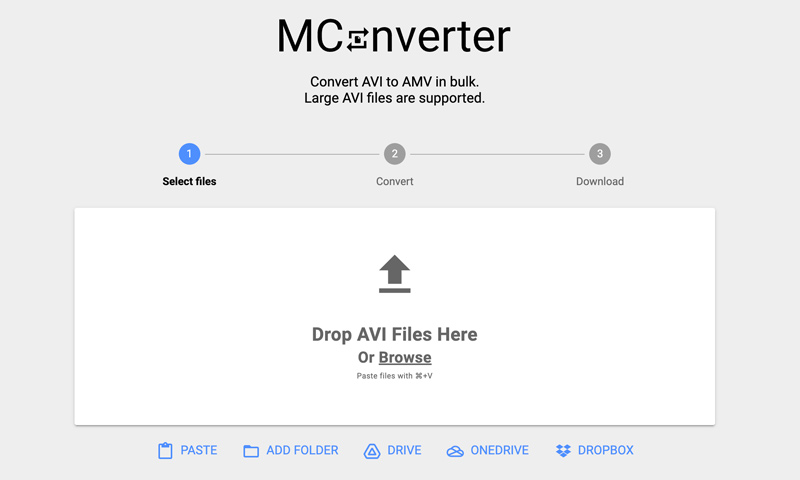
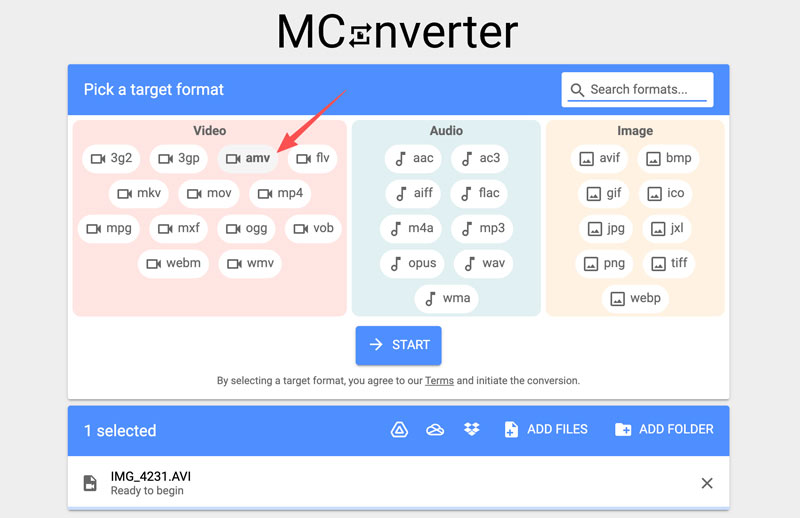
Once your AVI files are loaded, ensure the output format is AMV, and then click the Começar button. This online converter will start uploading and processing. The converted AMV files will be automatically downloaded.
Online AVI to AMV converters are not ideal for handling multiple files, especially these large ones. Moreover, their free tiers usually have file size and feature limits. So, you often need to upgrade to a paid plan to break limits, remove watermarks, or output high-quality results.
Question 1. Is AVI higher quality than MP4?
You should know that the final quality depends on the codec and bitrate used to encode the AVI or MP4 video. You can’t say AVI is higher quality than MP4, and vice versa. Neither AVI nor MP4 defines video quality. In modern use, MP4 with H.264 / H.265 is often a better choice that strikes a good balance between file size and quality.
Question 2. Why is AVI not used anymore?
AVI was an old video format that was developed in 1992. Its structure is weak for handling various modern uses, including embedded subtitles, rich metadata, and streaming needs. What’s more, AVI can’t handle modern efficient inter-frame compression properly. It only survives in some editing workflows and legacy systems. AVI also comes with a much bigger file size at the same quality, which is not good for distribution or sharing.
Question 3. What software to make AMVs (anime music videos)?
When you make anime/animated music videos, you should select the “best” AMV converter based on your specific needs. For instance, you may need certain editing or enhancement functions for the content creation. In some cases, you may only want a conversion tool.
You can start with the beginner-friendly Aiseesoft AMV creator. If you are willing to learn editing and prefer professional features, try using the free version of DaVinci Resolve. CapCut is also a good option for beginners to make AMVs.
Conclusão
In certain cases, you need to Converter AVI para AMV. Surely, the conversion is not about making your video look better. You often need it to make your video play normally on some old hardware. You can learn two different methods to get your AVI file playable. If you just need to turn an existing AVI into an AMV, try an online tool first, especially when the file is small. However, if you have multiple files or need parameter control, turn to the recommended Aiseesoft Video Converter Ultimate.
 Fantásticos 7 reprodutores AVI para reproduções de mídia sem esforço
Se você armazenou arquivos AVI e precisa de um reprodutor de vídeo que suporte o formato de mídia AVI. Por favor, sente-se e relaxe porque pesquisamos para você os 7 principais reprodutores AVI que são 100% adequados para o formato AVI. Assim, você pode reproduzir todos os seus arquivos de mídia AVI no seu PC.
 Conversor AMV - 5 Melhores Ferramentas Gratuitas de Conversor AMV para MP4/MP3 Player
Qual é o melhor conversor AMV? Como converter o formato AMV para MP4 ou MP3? Este post mostra os 5 melhores conversores de players AMV para ajudá-lo a converter MP4, AVI, M4A, MP3 para AMV ou converter AMV para outros formatos de áudio e vídeo.
 5 Melhores Aplicativos para Editar AMVs
Qual programa você está usando para fazer AMVs? Qual é o melhor software para criar AMVs? Este post mostra os 5 melhores aplicativos de edição de AMV, incluindo ferramentas de edição de AMV online e profissionais gratuitas para ajudá-lo a editar AMVs.
Converter/Baixar/Editar SWF
1.1 FRS1.2 SWF para MP41.3 SWF para GIF1.4 SWF para MOV1.5 SWF para HTML51.6 SWF para AVI1.7 SWF para WMV1.8 SWF para 3GP1.9 SWF para DVD1.10 Conversor SWF Mac1.11 Editar SWF
O Video Converter Ultimate é um excelente conversor, editor e aprimorador de vídeo para converter, aprimorar e editar vídeos e músicas em 1000 formatos e muito mais.
100% seguro. Sem anúncios.
100% seguro. Sem anúncios.

*Campo obrigatório
*Por favor, insira um e-mail válido