Converter vídeo Ultimate
 100% seguro. Sem anúncios.
Whether for better sound quality, wider compatibility, or smaller file size, it seems meaningless to converter MP3 em WMA. They are two lossy formats that have been around for years. In most cases, MP3 is a more suitable choice. So, why do you make the conversion?
When you need to copy music to a car stereo, an older Windows laptop, or a storage-constrained player, you know the difference. MP3 to WMA conversion is still a practical task in 2026, and this guide will tell you how to do it right.
The case for MP3 to WMA conversion is not about absolute sound quality at high bitrates. WMA was built to squeeze more perceived audio quality into smaller files. It generally holds up better than MP3 when you drop below 128 kbps. At comparable bitrates, WMA often produces a smaller file than MP3 while maintaining similar audio quality. If your device does not have much space, converting MP3 to WMA is necessary.
WMA is Microsoft’s default audio format, so it plays natively on Windows machines and with Windows Media Player. For ecosystem fit reasons, you may want to convert from MP3 to WMA. As mentioned, if your entire workflow or music library lives on an old Windows machine and you are tight on storage, WMA can be an ideal choice.
Many online tools can help you make the MP3-to-WMA conversion really easy. However, they all have similar restrictions, such as file size, features, long upload and processing times, and output settings. If you want more control than a web converter offers - batch processing, fast speed, bitrate adjustments, a proper output folder, and more- a desktop tool is the better route.
Aiseesoft Video Converter Ultimate is a great choice for various audio and video conversion needs. It has broad format support, including MP3, WMA, M4A, AAC, and FLAC. This allows you to directly convert any audio without issues. This converter lets you set the sample rate, channel, encoder, and bitrate instead of accepting a one-size-fits-all preset. What’s more, Aiseesoft supports batch conversion and hardware acceleration. That is quite helpful when you are dealing with lots of audio files.
100% seguro. Sem anúncios.
100% seguro. Sem anúncios.
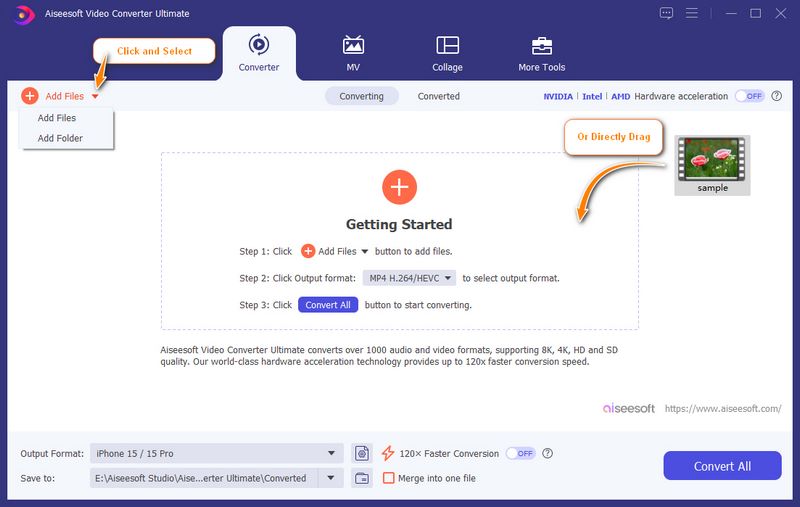
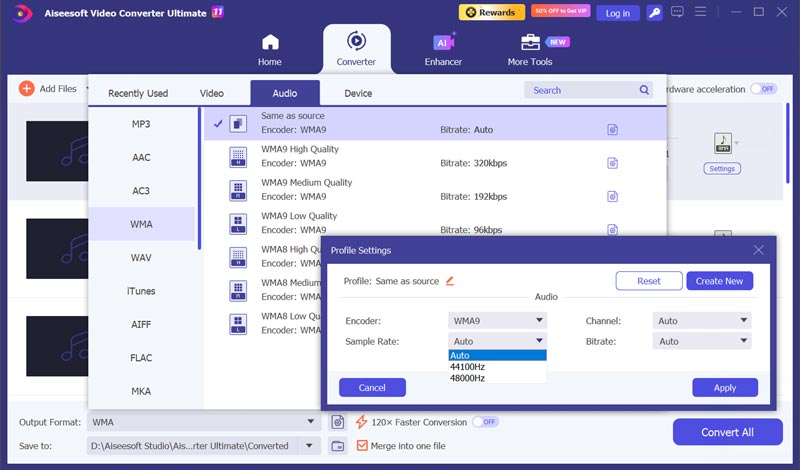
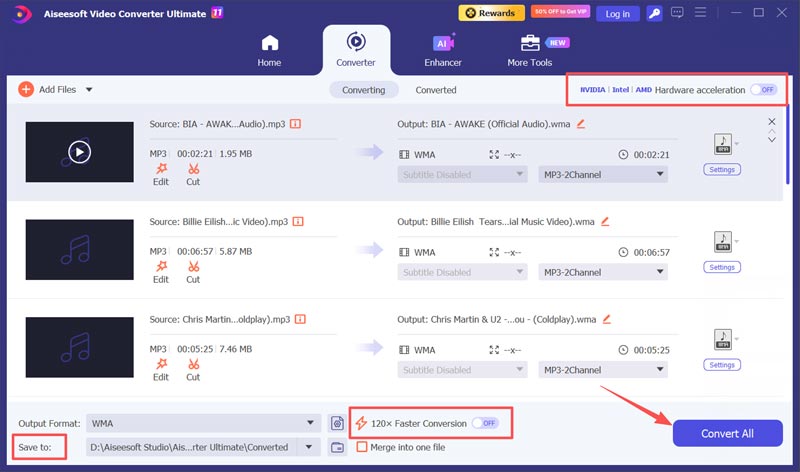
Once converted, check the output folder and play one file on the Jogador WMA of your target device.
MP3 is the most popular audio format that everyone knows. It is compatible with every laptop, every phone, every MP3 player. WMA, short for Windows Media Audio, is Microsoft’s default format for handling audio. The MP3 vs. WMA table below summarizes the practical differences you should know.
| Característica | MP3 | WMA |
| Compatibilidade | Quase universal Plays on almost every phone, computer, car stereo, and player | Strong on Windows and Windows Media Player Limited on Mac, Android, and many non-Microsoft devices |
| Efficiency at low bitrates | Acceptable at 128 kbps; degrades noticeably below that | Generally better perceived quality at 64–96 kbps 64 kbps WMA is roughly comparable to 128 kbps MP3 |
| Tamanho do arquivo | Larger at equivalent perceived quality | Menor WMA can store the same perceived audio in less space at low bitrates |
| High-bitrate performance | Well-established for most listeners at 192–320 kbps | Does not offer a better sound than MP3 at high bitrates |
| Ecossistema | Open standard, not tied to a single operating system | Proprietary Microsoft format A Windows-only workflow |
| Melhor caso de uso | Sharing, cross-device playback | Space-constrained Windows devices |
Question 1. Does converting MP3 to WMA improve sound quality?
No. Conversion cannot add detail that was not in the original MP3 and melhorar a qualidade. WMA’s advantage is efficiency at low bitrates, not high sound quality. If you convert an MP3 to WMA at the same* bitrate, you may actually introduce a small amount of generation loss.
Question 2. Can I convert MP3 to WMA using Windows Media Player?
No. Windows Media Player can play both formats but does not have a straightforward “export/convert to WMA” option. You should turn to a dedicated audio converter.
Question 3. Will WMA files play on my Android phone?
Android does not support WMA natively. You will need a third-party player app to open them. You can also converter WMA para MP3 para compatibilidade.
Conclusão
MP3 para WMA conversion makes the most sense for Windows users who want a more compact music library. The trade-off is also real. WMA is not universal. On a Mac or Android phone, you will need a third-party player to open WMA files. For everyone else, MP3’s universal compatibility remains a decisive advantage. Use the recommended Aiseesoft converter to convert audio with ease.
 Como converter M4A para MP3 sem perdas com 5 ferramentas [Resolvido]
O guia detalhado explicará como converter M4A para MP3 online e em um computador. Você pode seguir os 5 métodos para fazer sua conversão de M4A para MP3 aqui.
 Converta MP3 em AAC e por que AAC é seu próximo formato favorito
O AAC é melhor e de qualidade superior ao MP3? Como você transforma MP3 em formato AAC no Windows? Aprenda a converter MP3 em AAC em seus desktops, telefones e online.
 Os 7 melhores reprodutores de áudio de alta resolução para obter som com qualidade de estúdio no PC.
Existe algum reprodutor de áudio digital de alta resolução gratuito que seja o melhor para Windows? Confira a análise de 7 reprodutores de áudio de alta resolução para PC, Android e dispositivos iOS.
Converter/Baixar/Editar SWF
1.1 FRS1.2 SWF para MP41.3 SWF para GIF1.4 SWF para MOV1.5 SWF para HTML51.6 SWF para AVI1.7 SWF para WMV1.8 SWF para 3GP1.9 SWF para DVD1.10 Conversor SWF Mac1.11 Editar SWF
O Video Converter Ultimate é um excelente conversor, editor e aprimorador de vídeo para converter, aprimorar e editar vídeos e músicas em 1000 formatos e muito mais.
100% seguro. Sem anúncios.
100% seguro. Sem anúncios.

*Campo obrigatório
*Por favor, insira um e-mail válido