Aiseesoft Video Converter Ultimate
 100% seguro. Sem anúncios.
100% seguro. Sem anúncios.
conteúdo
How to get audio from video?
Extracting audio from video is a very common need for students, creators, professionals, and casual users. In many cases, you only need the audio to keep the essential information, such as a lecture, interview, webinar, concert film, or game footage. Whether for learning, content creation, offline listening, or business use, there are different reasons why you might need to isolate audio from video.
This guide explores five efficient methods to extract audio from video on computers and mobile phones. You can select either a one-click AI tool, an online audio isolator, professional software, or a mobile app.
Among numerous video-to-audio extraction or conversion tools, Aiseesoft Video Converter Ultimate stands out as a powerful all-in-one solution. Compared to its competitors, it offers more advanced functions. It not only supports quick audio extraction from video, but also effortlessly edits and enhances audio, even uses AI technology to separate clear vocals from background music.
100% seguro. Sem anúncios.
100% seguro. Sem anúncios.
Supports all commonly used video and audio formats. It can convert videos to various formats for different playback devices and platforms.
Produção de alta qualidade. The advanced conversion engine guarantees that your extracted audio is lossless.
AI smart audio separation. Its AI can extract the main audio content, isolate vocals, or get background music separately. This ensures you take the desired audio tracks from videos.
Powerful editing and enhancement functions. Built-in video editor and enhancer can freely edit the source video file and improve the final audio quality.
Steps to Get Audio from Video Using Aiseesoft
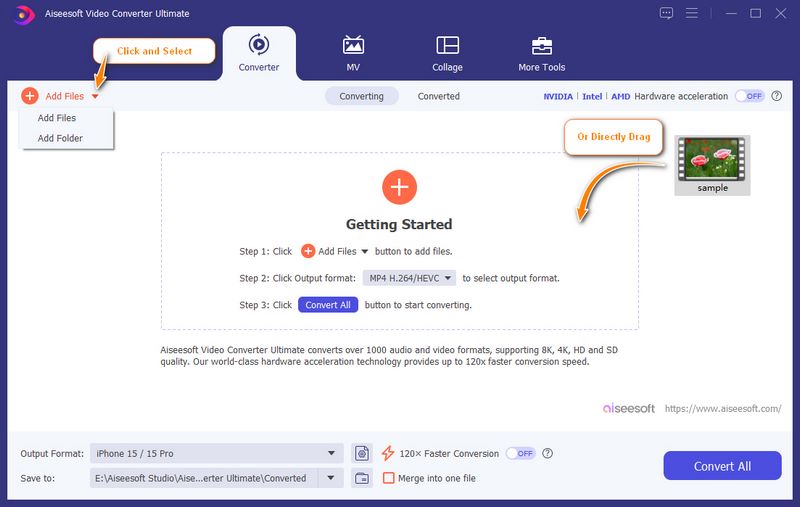
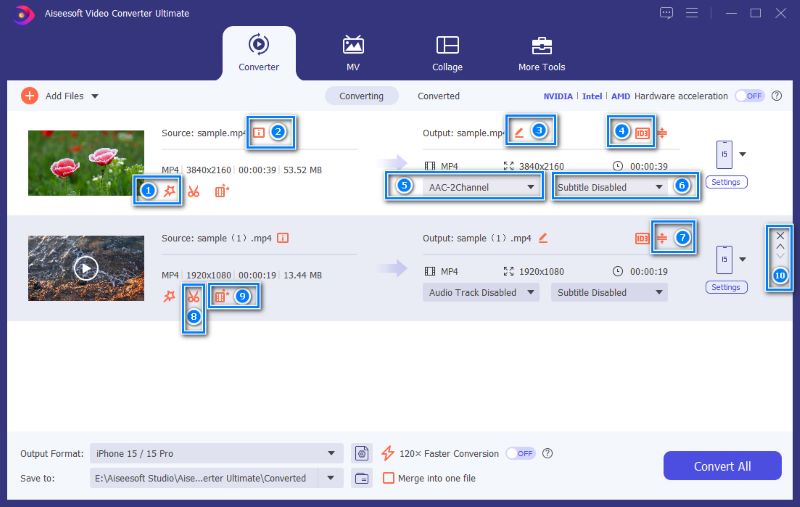
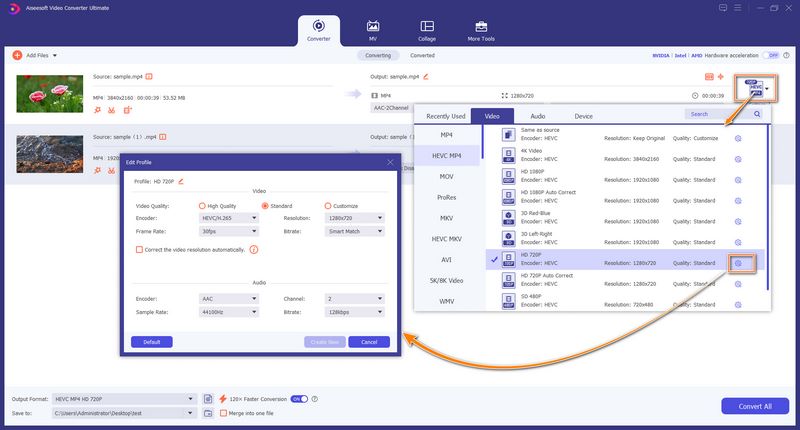
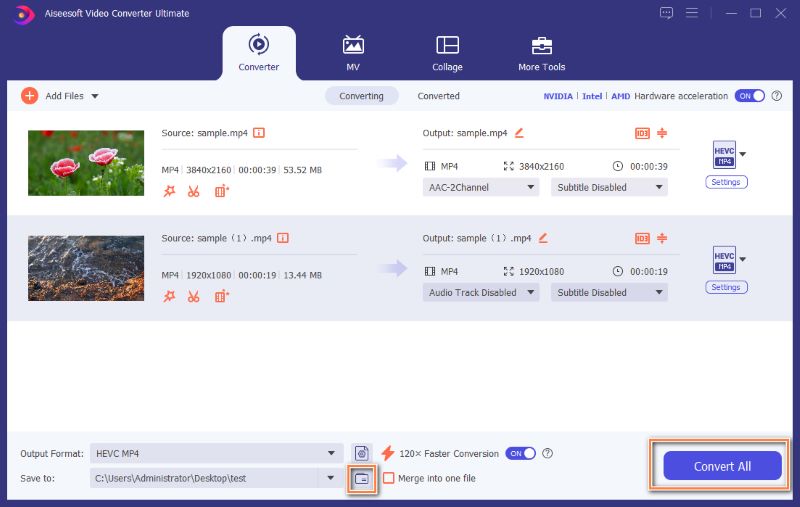
For users who frequently handle video and audio files, the software is a very reliable productivity tool. The significant advantage lies in its all-in-one solution. It cannot only extract audio, but also perform editing, format conversion, enhancement, and more.
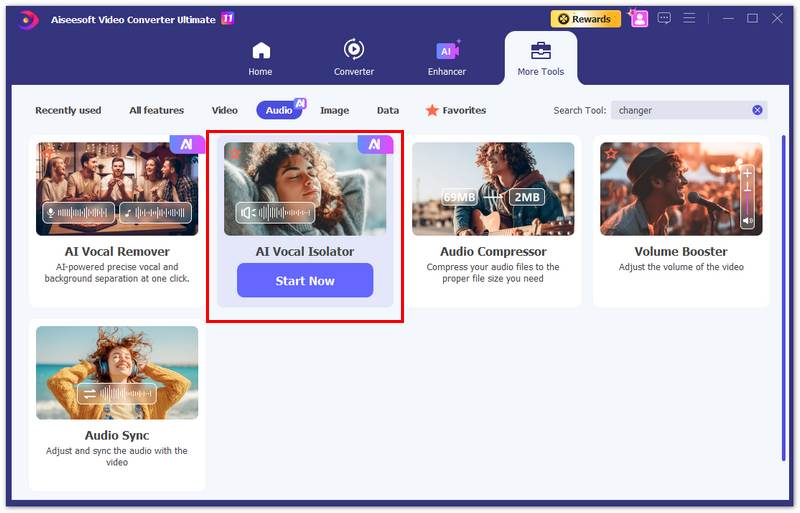
Besides simple audio extraction from video, you may also need to separate vocals from background music or some complex sounds. In some cases, you don’t want the whole audio, but a specific part of it. You need to remove the background noise to hear the core voice clearly. This is where the built-in Isolador Vocal por IA in Video Converter Ultimate comes in handy.
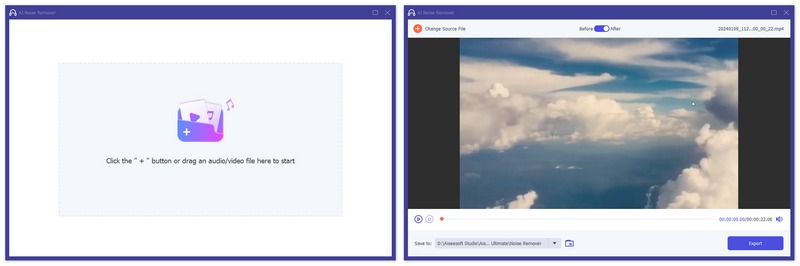
If you prefer to remove unwanted background noise from your video or audio file and export clear audio, you can try using its Removedor Vocal AI.
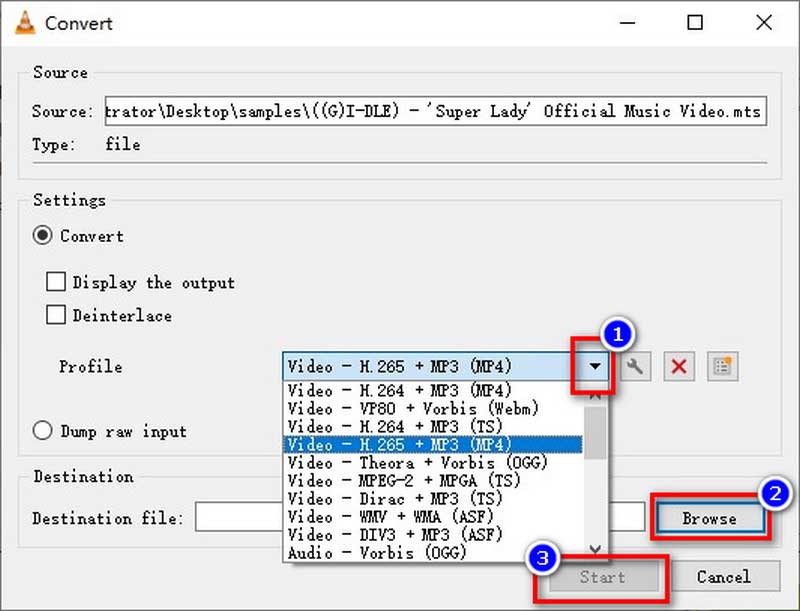
If you only need to extract audio from one or several video files, and don’t want to install specialized conversion software, VLC Media Player is a great choice, especially when you already have it on your device. You can play all commonly used multimedia files and play Blu-ray movies with VLC Media Player. Besides, the software has built-in video conversion and audio extraction capabilities.
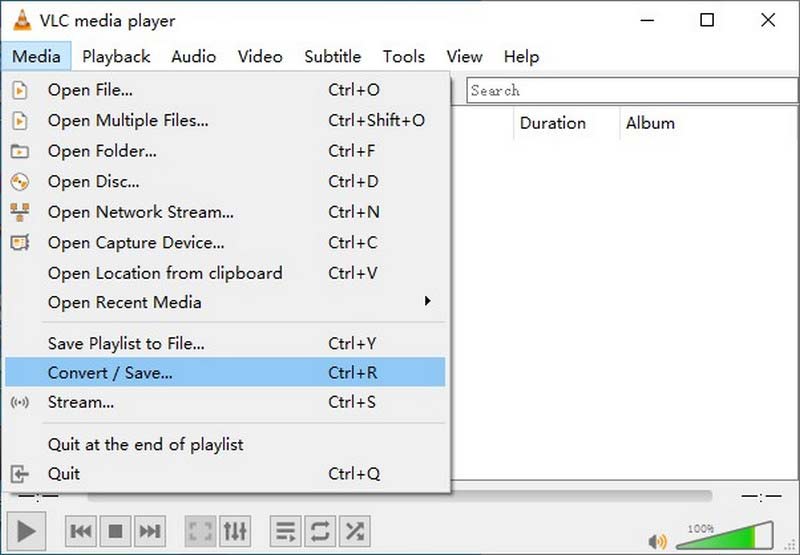
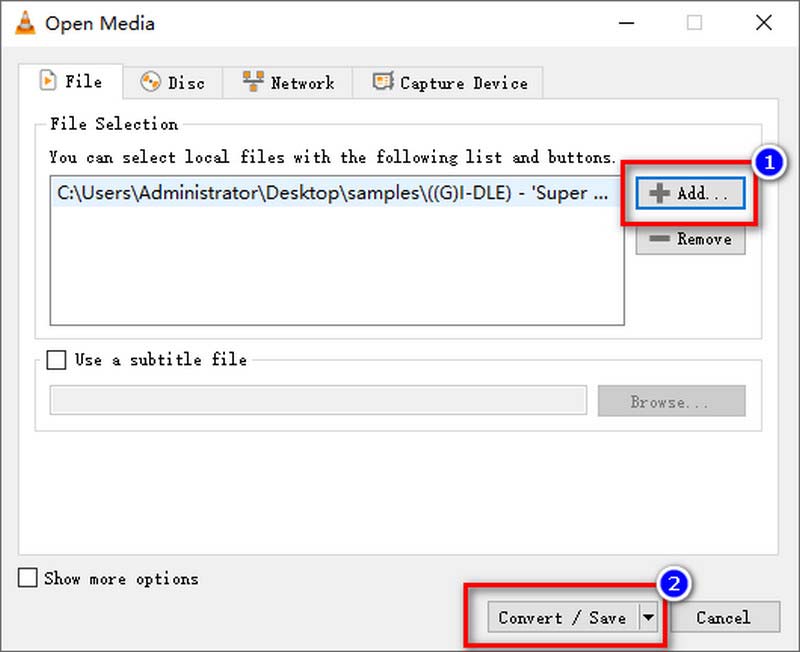
Before the audio extraction from the video, you can click Configurações to adjust encoding parameters, bitrate, and more.
When you need quick audio extraction without installing any software, you can also turn to online tools. Many platforms are specifically designed for audio-video separation. This section takes the popular Extrator de áudio de retransmissão como um exemplo.
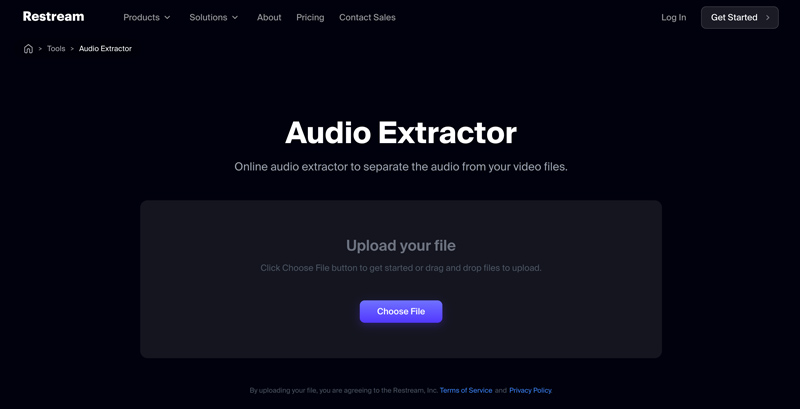
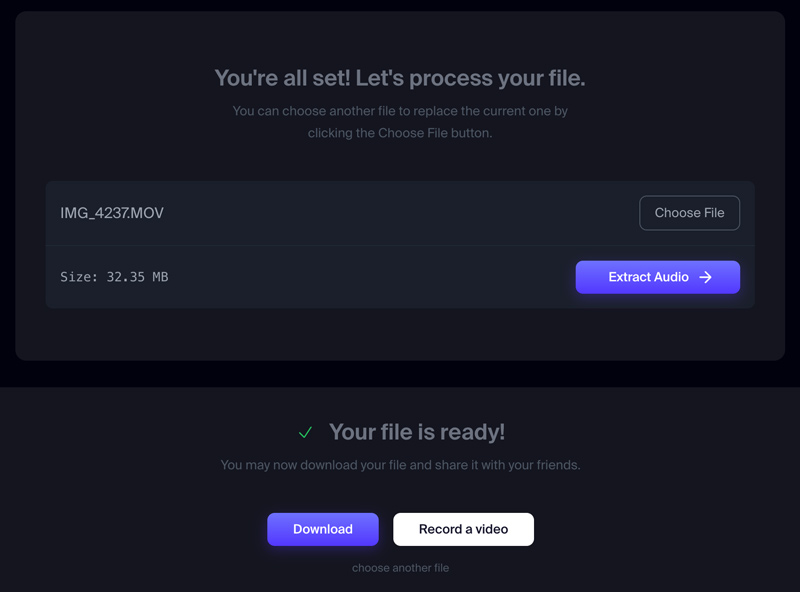
Like other online audio extraction and video-to-audio conversion tools, Restream is perfect for small clips or social media videos. Even though it allows you to upload a video of less than 2GB, the whole audio extraction will take a really long time. Moreover, you’d better not upload sensitive or private recordings to these online servers.
If you often deal with all types of audio conversion or editing tasks, a professional-level audio editor like Adobe Audition is a great choice. It is the industry standard that is widely used for audio professionals or content creators. You can not only extract audio from videos, but also melhorar o áudio no Adobe, such as audio mixing, restoration, noise reduction, and more.
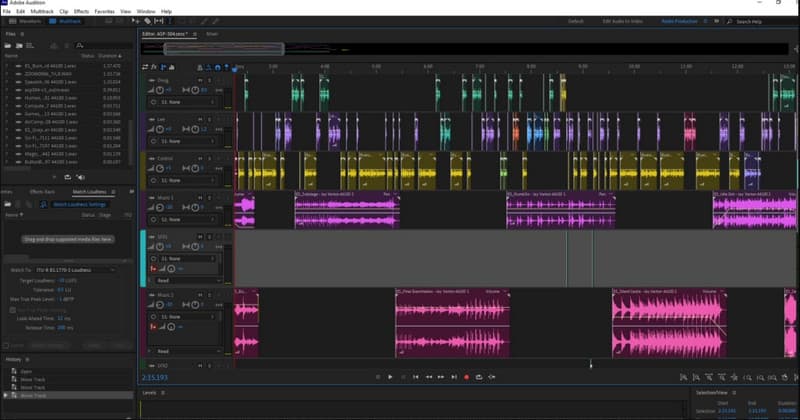
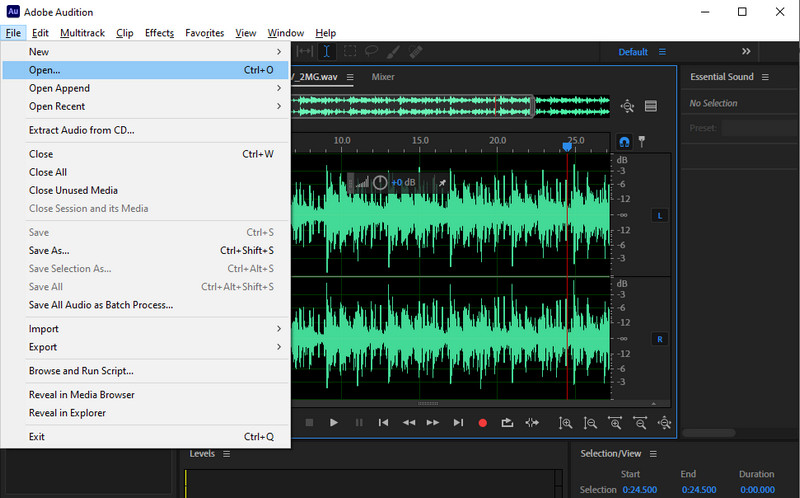
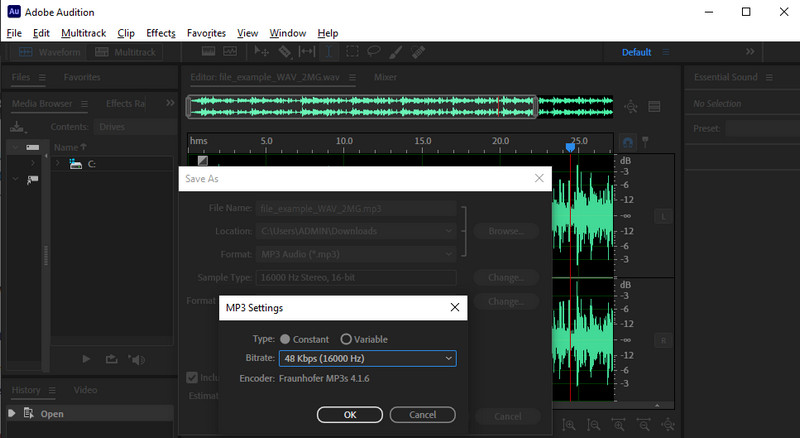
Adobe Audition provides professional-grade audio processing capabilities. It supports multi-track editing, complex mixing, and advanced enhancement. Moreover, the software can integrate with Premiere Pro and other Adobe software seamlessly. That ensures high-quality outputs. However, it requires a paid subscription (Adobe Creative Cloud) and a good computer. For general users and beginners, it is not a good choice.
If you prefer to edit and process videos directly on your phone, especially for recent recordings and online saves, you can rely on some third-party apps to extract audio from videos.
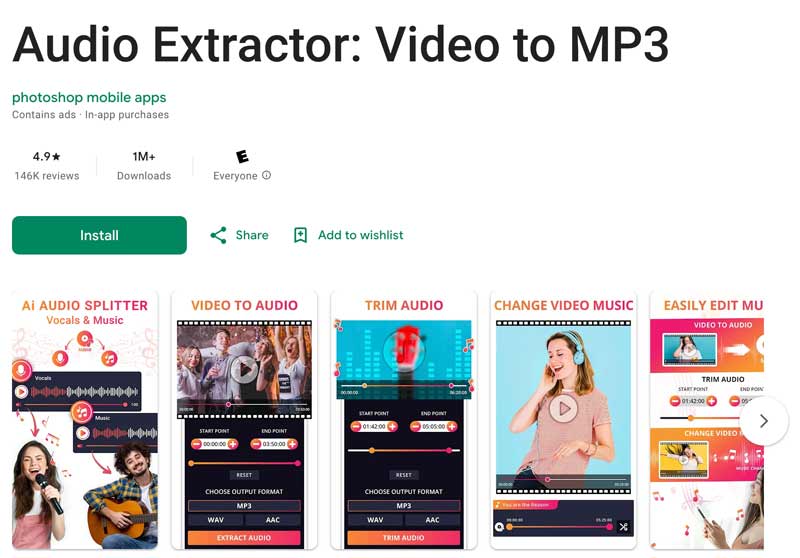
When you need to get audio from a video on an Android phone, you can download specialized audio extraction apps from the Google Play Store. Search for “extrator de áudio” to quickly locate them.
Os aplicativos recomendados incluem Extrator de áudio: vídeo para MP3, InShot Video to MP3, MP3 Converter, Audio Extractor, and more.
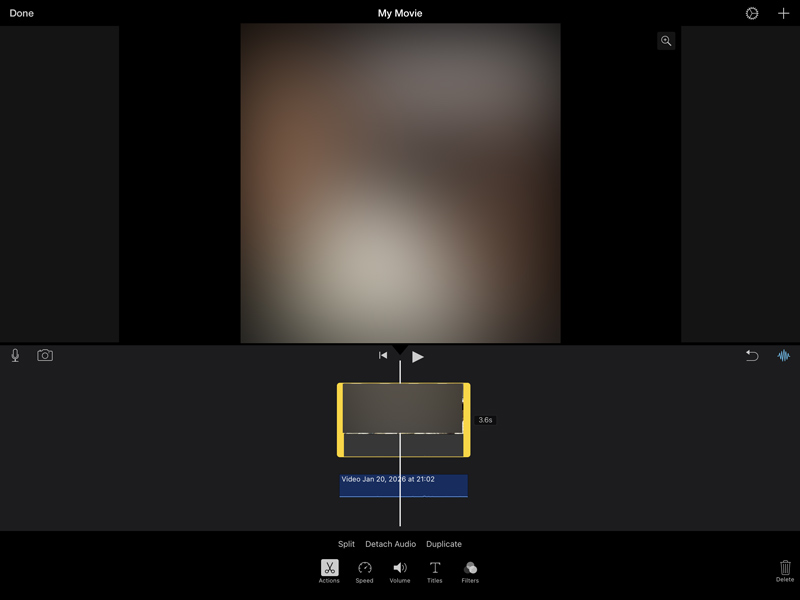
iMovie is the default video and audio editing software for Apple devices. You can use the mobile app on your iPhone or iPad for common conversion needs.
What is the best way to extract audio from a video on Windows?
As a Windows 11 user, you can rely on the built-in Microsoft Clipchamp to extract audio from a video with ease. It has a dedicated “Detach Audio” feature to do that. If you still use Windows 10, start with VLC to get audio from your video for free. If you want the highest sound quality and various advanced functions and controls, Aiseesoft Video Converter Ultimate is the professional choice. This audio extractor is particularly useful if you often deal with 4K videos or need to extract audio from multiple video files at once.
Is VLC a good audio extractor for getting audio from videos?
Yes, VLC is a good audio extractor for Windows, macOS, and Linux users. It provides a 100% free way to isolate audio from a video and export it to a desired format. It can handle almost any file type.
Can iMovie grab audio from video on a Mac?
Yes, iMovie offers a reliable way to grab audio from videos on a Mac. It has already built into macOS. You can directly load your video to it and then grab the audio with ease. However, iMovie cannot separate vocals from background music.
Conclusão
Para propósitos diferentes, você precisa get audio from video or convert videos to audio. For instance, you want to grab audio for listening conveniently or saving storage. Whatever your need, extracting audio from videos is a necessary skill. You can compare the five methods above and select your preferred way to extract audio with high sound quality. Whether you are a professional creator or a casual user, there is always a suitable solution.
 Análise do Audacity Voice Recorder e aprenda a gravar áudio.
O Audacity é adequado para gravação vocal? Como capturar a voz com ele? Aqui está uma análise detalhada do Audacity para mostrar seus recursos, uso e limitações. Aprenda a usá-lo com atenção!
 7 maneiras de adicionar áudio a vídeos e elevá-los com som
Como você mescla áudio e vídeo? Posso sobrepor áudio em meu vídeo online sem marca d'água? Esta postagem compartilha sete métodos simples para adicionar áudio a vídeos.
 4 maneiras fáceis de gravar áudio interno no Windows 11 a 7
Como gravar o áudio interno no Windows 11 ou 10? Este guia apresenta 4 maneiras comprovadas de gravar o áudio do sistema no Windows como um profissional, de forma fácil.
Editar áudio em vídeo
Adicionar música ao vídeoAdicionar áudio ao vídeoAdicionar áudio 3D ao vídeoExtrair áudio do vídeoRemover áudio do vídeoRemover Ruído do VídeoMesclar arquivos de áudioComo separar o áudio do vídeoMúsica de fundo para vídeoCriador de vídeos musicaisEditor de vídeo com efeitos sonorosComo adicionar música ao Movie MakerMelhorar a qualidade do áudio
O Video Converter Ultimate é um excelente conversor, editor e aprimorador de vídeo para converter, aprimorar e editar vídeos e músicas em 1000 formatos e muito mais.
100% seguro. Sem anúncios.
100% seguro. Sem anúncios.

*Campo obrigatório
*Por favor, insira um e-mail válido