
Melhor para: Solução completa para gravação de som e imagem (áudio do sistema, microfone e tela) para a maioria dos usuários, educadores e profissionais.
Aiseesoft Screen Recorder
 100% seguro. Sem anúncios.
100% seguro. Sem anúncios.
Em muitos casos, não é permitido baixar áudio diretamente, especialmente para conteúdo de streaming e protegido por direitos autorais. Em vez disso, você opta por usar um... Gravador MP3 Para gravar músicas, palestras, podcasts e muito mais.
Este guia analisa os 7 melhores softwares para desktop e aplicativos móveis disponíveis atualmente. Se você está procurando um bom gravador para capturar áudio de alta qualidade, especificamente no formato MP3, para músicas, palestras, podcasts, entrevistas e até mesmo chamadas, continue lendo e encontre o melhor gravador de MP3 para suas necessidades.
Como testamos e avaliamos
Se você precisa de um gravador de MP3 para PC com Windows ou Mac e frequentemente precisa capturar diversos tipos de áudio, preste atenção a esta seção. Comparados aos aplicativos para dispositivos móveis, os softwares para desktop oferecem funções mais avançadas e desempenho mais estável. Eles são projetados principalmente para produção musical, criação de podcasts, webinars longos e outras tarefas de gravação mais exigentes. Abaixo, apresentamos os quatro melhores gravadores de MP3 para desktop.
Melhor para: Solução completa para gravação de som e imagem (áudio do sistema, microfone e tela) para a maioria dos usuários, educadores e profissionais.
Ponto: 4.8/5.0
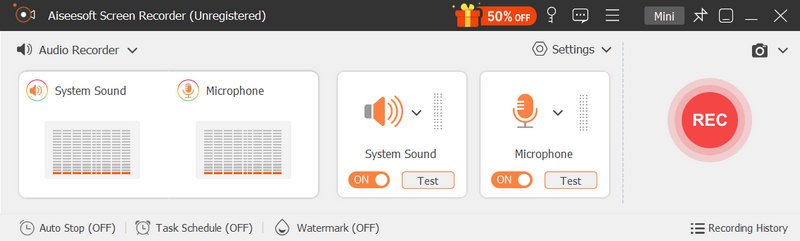
Aiseesoft Screen Recorder oferece um dedicado Gravador de Áudio Para você capturar qualquer som reproduzido no seu computador. Ele pode gravar áudio do sistema de som interno, microfone/alto-falante externo, simultaneamente ou separadamente. É ideal para gravar reuniões online, músicas, trilhas sonoras, podcasts e áudio em streaming. Além de MP3, este gravador de MP3 permite salvar suas gravações em qualquer formato de áudio com ou sem perdas.
100% seguro. Sem anúncios.
100% seguro. Sem anúncios.
Prós
Contras
Melhor para: Usuários com orçamento limitado, como criadores de conteúdo em geral, podcasters e músicos que precisam de gravação e edição de áudio multipista.
Ponto: 4.7/5.0
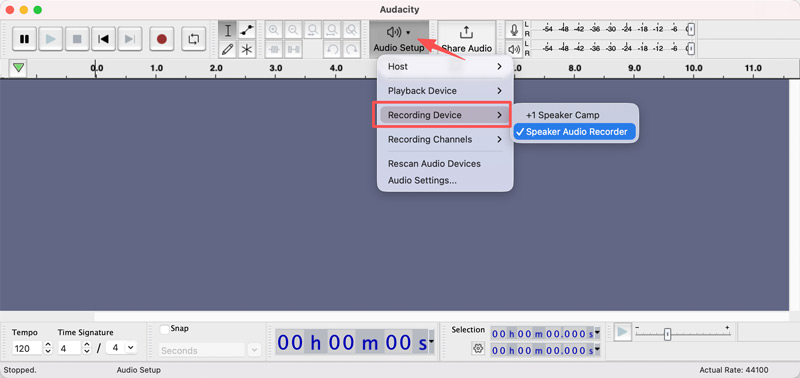
Audacity É um gravador de áudio de código aberto e de boa reputação, conhecido por seus recursos de gerenciamento de múltiplas faixas. É uma ferramenta consagrada para criadores de áudio, podcasters e muitos usuários casuais. Como gravador de MP3, permite capturar áudio ao vivo através de um mixer ou microfone. Além disso, o software possibilita sobrepor várias faixas, aplicar efeitos sonoros e realizar edições básicas.
Prós
Contras
Melhor para: Criadores e usuários de tutoriais em vídeo que frequentemente precisam gravar e exportar narração.
Ponto: 4.5/5.0
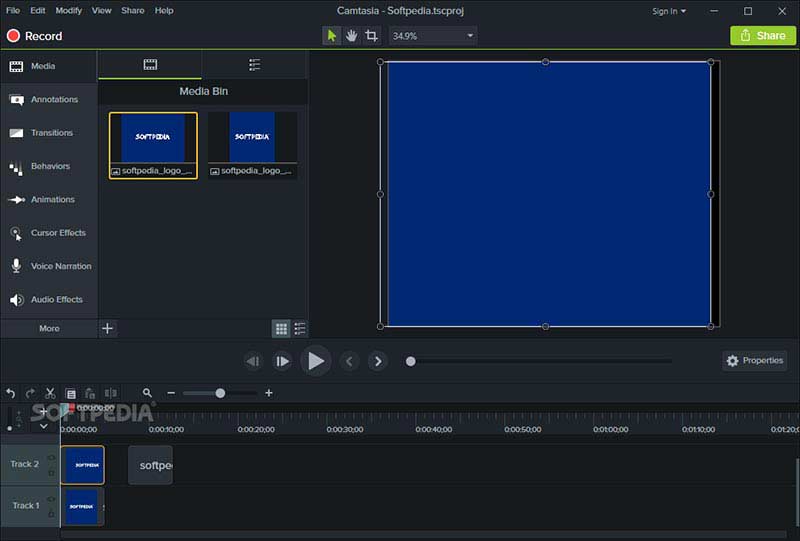
Camtasia Screen Recorder O Camtasia, da TechSmith, foi projetado principalmente como um pacote de edição de vídeo e gravação de tela. O software oferece gravação de áudio, captura de tela, edição, supressão de ruído e outras ferramentas úteis em um único fluxo de trabalho. Assim como o Aiseesoft, o Camtasia permite a captura de áudio de um microfone ou do sistema. Como gravador de voz em MP3, ele suporta narração e mixagem de música.
Prós
Contras
Melhor para: Usuários avançados, como profissionais de áudio, designers de som e podcasters de nível profissional.
Ponto: 4.7/5.0
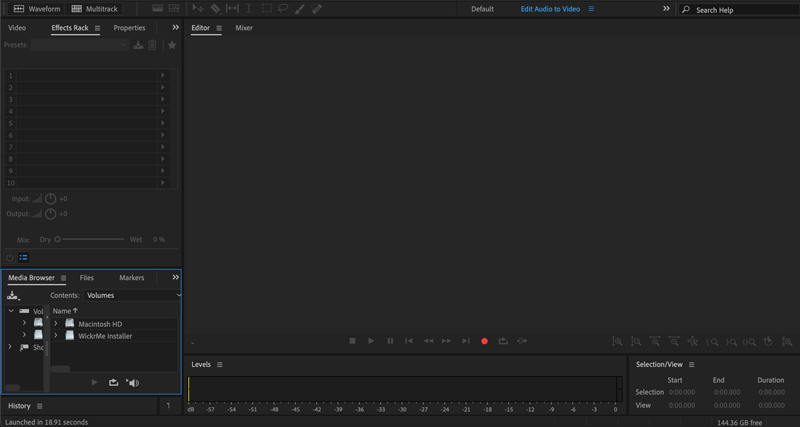
Adobe Audition O Audition é uma ferramenta profissional de gravação, mixagem e restauração de áudio. Assim como outros programas da Adobe, o Audition pode ser considerado o padrão da indústria para gravação e edição de áudio profissional. O software é amplamente utilizado por estações de rádio e estúdios musicais. Este gravador de áudio oferece um ambiente de gravação multipista não destrutivo.
Prós
Contras
Os smartphones modernos vêm equipados com microfones potentes para captar vozes. Aliás, com o aplicativo certo, você pode transformar seu celular em um excelente estúdio de gravação. Se você costuma precisar gravar palestras, entrevistas ou trilhas sonoras do dia a dia em qualquer lugar e prefere gravar áudio diretamente com o celular, os aplicativos móveis são indispensáveis.
Melhor para: Profissionais, estudantes e a maioria dos usuários casuais que precisam de um gravador de MP3 confiável e descomplicado para uso diário.
Ponto: 4.7 / 5.0
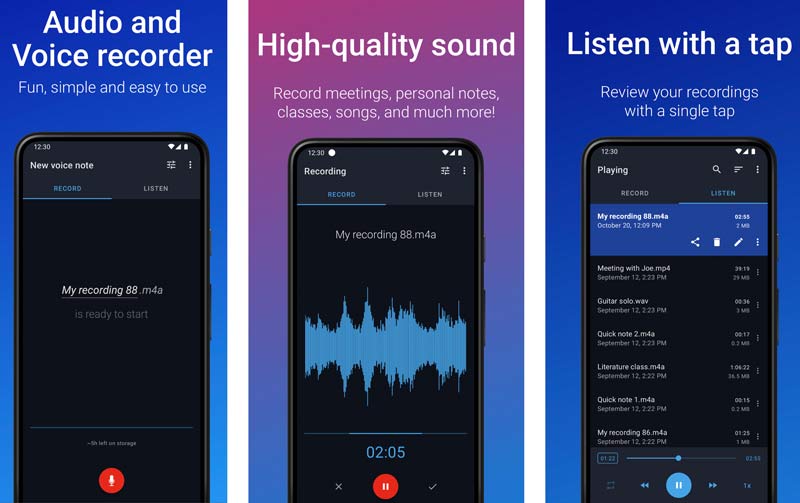
Fácil Gravador de Voz O Easy Voice Recorder oferece uma maneira rápida e confiável de gravar sua voz e salvá-la como um arquivo MP3. Basta abrir o aplicativo e tocar no grande botão do microfone para iniciar a gravação. Ele é especialmente otimizado para gravações longas, o que o torna o companheiro perfeito para estudantes gravarem aulas e profissionais registrarem reuniões extensas. Este aplicativo funciona de forma estável em segundo plano, sem interromper outras operações no seu telefone.
Prós
Contras
Melhor para: Usuários de Android que frequentemente precisam gravar memorandos e anotações de voz, entrevistas, palestras, reuniões de negócios e outros.
Ponto: 4.6/5.0
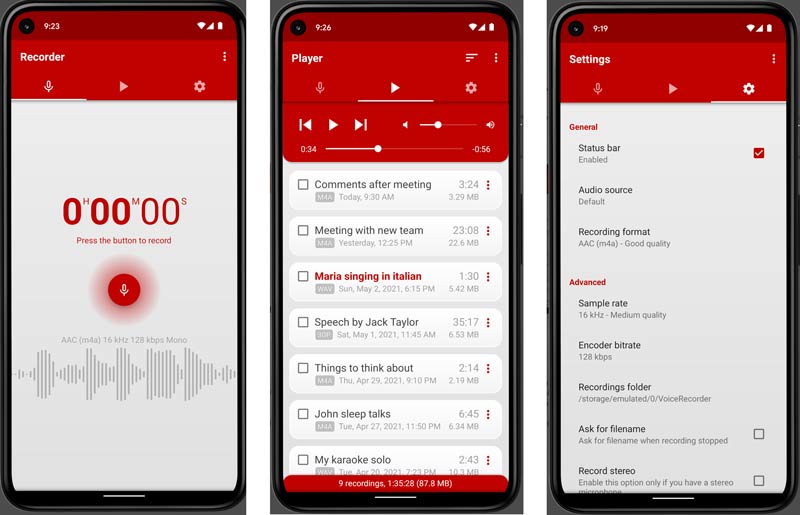
Gravador de Voz Pro O aplicativo da Splend Apps é um popular gravador de voz em MP3 para dispositivos Android. Ele oferece uma maneira prática de capturar áudio discretamente em segundo plano, mesmo com a tela desligada. Além disso, permite que os usuários codifiquem o áudio diretamente em quatro formatos distintos: MP3, WAV, AAC ou AMR. O aplicativo também inclui um reprodutor de mídia e um gerenciador de arquivos integrados para melhor organização das gravações.
Prós
Contras
Melhor para: Podcasters, músicos, cantores e criadores de conteúdo para redes sociais que desejam capturar instantaneamente um som com qualidade de estúdio, sem mixagem manual.
Ponto: 4.4/5.0
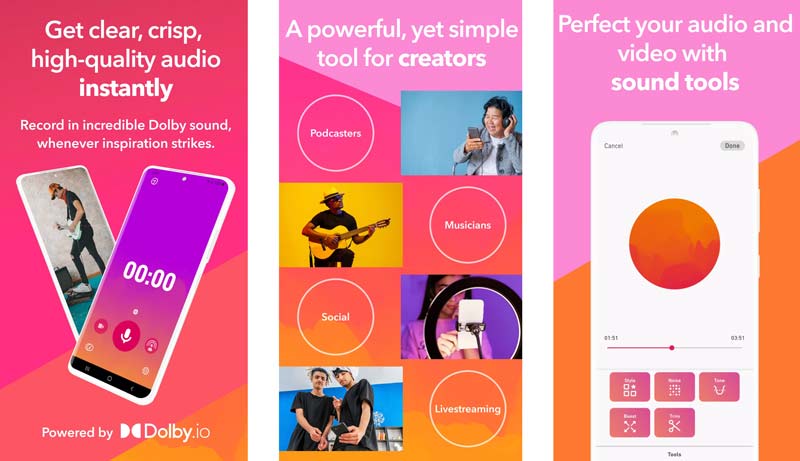
Dolby ligado O Dolby On é um aplicativo móvel de gravação de áudio projetado para capturar suas músicas e vídeos ou transmitir ao vivo para seus fãs com o incrível som Dolby. Desenvolvido pelos pioneiros em áudio da Dolby, este aplicativo de gravação de MP3 permite gravar sua voz ou instrumento e adicionar instantaneamente os efeitos de estúdio desejados. O Dolby On oferece diversas funções avançadas, incluindo redução de ruído, equalizador dinâmico, compressão, expansão estéreo e muito mais. Ele transforma seu iPhone ou Android em um gravador profissional para capturar áudio em MP3.
Prós
Contras
Pergunta 1. Qual é o melhor gravador de MP3 online?
Muitos gravadores de MP3 online permitem capturar sua voz ou som surround através do microfone do seu dispositivo. O melhor depende muito das suas necessidades específicas. Opções populares incluem o 123Apps Online Voice Recorder, Aiseesoft Gravador de Áudio GratuitoVocaroo, VEED MP3 Recorder e o gravador de voz online gratuito do Canva.
Pergunta 2. O aplicativo Gravador de Voz padrão do meu iPhone consegue gravar em MP3?
Não. O aplicativo Gravador de Voz padrão em dispositivos Apple só consegue gravar áudio em M4A. Esse formato de áudio oferece excelente qualidade de som. No entanto, em comparação com o MP3, o M4A não possui a mesma compatibilidade universal. Se você precisar gravar áudio em MP3, deverá usar um aplicativo de gravação de terceiros.
Pergunta 3. Como posso converter minhas gravações de áudio para MP3?
Muitos conversores de áudio podem ajudá-lo a converter arquivos para MP3 com facilidade. Por exemplo, softwares recomendados para computador, como o Audacity ou o Adobe Audition, permitem importar gravações em M4A, WAV ou FLAC e exportá-las como arquivos MP3.
Pergunta 4. O software gratuito de gravação de áudio é suficientemente poderoso?
Sim. Para a maioria dos usuários casuais e necessidades de gravação, muitas ferramentas gratuitas são suficientemente poderosas. Por exemplo, você pode usar o Audacity, que é gratuito, para lidar com a maioria das tarefas de gravação e edição de áudio. Como mencionado acima, ele suporta gravação multipista, remoção de ruído e aplicação de efeitos. Se você precisar apenas capturar o conteúdo principal de uma palestra, entrevista ou conversa, a maioria das opções disponíveis oferece recursos suficientes. gravadores de voz são suficientes.
Conclusão
Seja para gravar podcasts de alta qualidade, capturar palestras importantes ou salvar suas anotações e ideias diárias, você pode selecionar um aplicativo adequado. Gravador MP3 dentre as sete principais recomendações acima.
Você pode encontrar o gravador perfeito com base nas suas necessidades específicas e no seu ambiente de trabalho preferido. Se você é um podcaster ou músico profissional que precisa de precisão cirúrgica, opte pelo poderoso Adobe Audition. Você também pode começar com o Audacity e testar seus recursos gerais de gravação e mixagem multipista. Para a maioria dos usuários, o Aiseesoft Screen Recorder oferece uma maneira simples de capturar suas vozes, músicas, palestras, entrevistas e transmissões online sem esforço.
 Os 10 melhores gravadores de voz para Windows 11/10 em 2026 [Gratuitos e Pagos]
O Windows possui gravadores de voz integrados? Qual software de gravação de voz consegue gravar tanto o som do sistema quanto o do microfone? Este artigo apresenta os 10 melhores gravadores de voz para Windows.
 8 gravadores de voz Samsung que você pode usar para gravar chamadas e voz facilmente
Como gravar uma chamada telefônica no Samsung? Você pode usar o recurso embutido no Samsung para gravar chamadas, mas existem aplicativos que você pode usar para gravar.
 8 melhores gravadores de microfone online gratuitos para gravações de voz ilimitadas
Leia e descubra os 8 melhores gravadores de microfone online. Você pode gravar sua voz com um microfone no Windows e no Mac gratuitamente, seguindo Passos simples e rápidos.
Flauta doce
Gravador de áudio cinch1.1 Gravador de tela1.2 Software de transmissão de tela1.3 Software de Captura de Vídeo1.4 Software de fluxo de tela1.5 Os 6 principais editores de áudio M4A (gratuitos e pagos) para editar arquivos M4A como um profissional1.6 Gravador MP31.7 Captura de tela do Android1.8 Gravador de Voz Android1.9 Gravador de cassetes
O Aiseesoft Screen Recorder é o melhor software de gravação de tela para capturar qualquer atividade, como vídeos online, chamadas de webcam, jogos no Windows/Mac.
100% seguro. Sem anúncios.
100% seguro. Sem anúncios.

*Campo obrigatório
*Por favor, insira um e-mail válido