
Melhor para: Estudantes, profissionais e a maioria dos usuários casuais que precisam de um gravador de áudio confiável e de alta qualidade para gravar aulas online ou reuniões do Zoom.
Aiseesoft Screen Recorder
 100% seguro. Sem anúncios.
100% seguro. Sem anúncios.
Garanta que você nunca mais perca um detalhe da aula; além de anotações manuscritas, é melhor ter um gravador de palestras.
Seja você um estudante tentando acompanhar o professor ou um profissional precisando de um registro preciso de uma reunião importante, um aplicativo ou dispositivo dedicado à gravação de aulas geralmente é necessário.
Procura uma forma confiável de gravar apresentações escolares ou empresariais? Explore as nossas 5 melhores opções de gravadores de aulas nesta análise, incluindo software robusto para computador, aplicativos móveis práticos e dispositivos de hardware dedicados. Compare-os e faça uma escolha informada com facilidade.
Como testamos e avaliamos as gravações de aulas
Para garantir que nossas recomendações sejam práticas e confiáveis, nós as avaliamos por meio dos seguintes cinco critérios principais:
1. Qualidade de áudio. A qualidade do áudio gravado é sempre a principal preocupação. Ele deve capturar claramente o conteúdo principal, mesmo à distância. Além disso, um bom gravador de palestras deve ter recursos como "cancelamento de ruído" ou "isolamento de voz".
2. Facilidade de uso e confiabilidade. O aplicativo ou dispositivo de gravação de aulas deve permitir que você grave instantaneamente assim que a aula começar, sem nenhuma configuração complexa.
3. Formato e capacidade de expansão. O gravador de aulas deve capturar o áudio no formato desejado, como MP3 (formato longo) ou WAV (sem perdas). Além disso, o dispositivo de gravação deve ter um slot para cartão microSD para gravações longas e de grande tamanho.
4. Autonomia da bateria e capacidade de armazenamento. Muitas palestras e seminários podem durar horas. Seu gravador deve funcionar durante toda a sessão, sem interrupções.
5. Recursos bônus. Os aplicativos de gravação modernos oferecem transcrição automática, marcação de páginas, sincronização entre dispositivos e outros recursos inteligentes. Essas funcionalidades que economizam tempo podem melhorar significativamente seu fluxo de trabalho.
| Gravador de Palestras | Formato | Mais Adequada Para | principais destaques | Plataforma |
| Aiseesoft Screen Recorder | Software de desktop | Captura abrangente Gravação de palestras, reuniões, jogos, webcam e telas de celular. | Excelente modo somente de áudio Interface fácil Exportações de alta qualidade | Windows/Mac |
| Otter.ai | Aplicativo móvel/web | Transcrição em tempo real Anotações automáticas de reuniões para Zoom, Google Meet, Microsoft Teams e muito mais. | Transcreva a voz em tempo real | iOS, Android, Web |
| Notabilidade | Aplicativo móvel/web | Anotações manuscritas sincronizadas com áudio Grave aulas e obtenha transcrições de áudio instantâneas. | Marcar documentos Registre palestras e reuniões, organize ideias. Suporte superior para Apple Pencil | iOS, iPadOS, macOS |
| Sony ICD-UX570 | Gravador de voz de hardware | Captura de voz presencial confiável | Bateria com duração superior a 20 horas e carregamento rápido. Qualidade de som aprimorada e design mais fino. Microfone estéreo integrado e gravação ativada por voz. | Dispositivo autônomo |
| Gravador portátil Zoom H1e | Gravador de hardware | Músicos e criadores podem capturar áudio de alta fidelidade. | Gravação estéreo de 32 bits em ponto flutuante Microfones X/Y de alta qualidade capturam áudio nítido. Microfone USB para PC, Mac, iOS ou Android | Dispositivo autônomo |
Se você precisa gravar aulas ou reuniões online, um dispositivo de hardware provavelmente resultará em baixa qualidade de som. Nesse caso, um software para computador ou um aplicativo para celular costuma ser uma opção melhor. Ele captura o áudio do sistema diretamente da placa de som interna, garantindo uma clareza digital perfeita.
Melhor para: Estudantes, profissionais e a maioria dos usuários casuais que precisam de um gravador de áudio confiável e de alta qualidade para gravar aulas online ou reuniões do Zoom.
Ponto:4.8/5
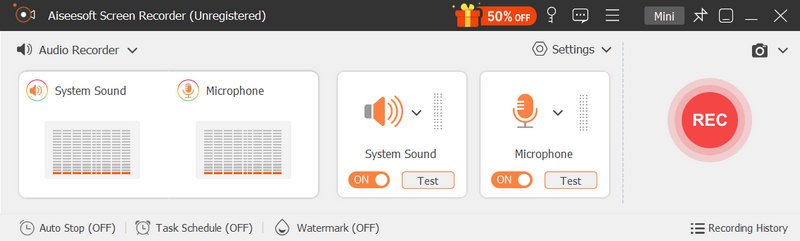
Aiseesoft Screen Recorder é um software de gravação de vídeo e áudio repleto de recursos, projetado para capturar qualquer coisa na sua área de trabalho. Embora seja chamado de gravador de tela, possui poderosos recursos dedicados à gravação de voz/áudio. Isso o torna ideal para gravar aulas online, reuniões e muito mais, sem a necessidade de gravar o vídeo. Como gravador de aulas, ele pode capturar o som do sistema, do microfone ou de ambos.
100% seguro. Sem anúncios.
100% seguro. Sem anúncios.
Por que escolher?
O gravador de aulas Aiseesoft oferece potência e facilidade de uso. Ele foi projetado com uma interface intuitiva para garantir um início rápido. Mesmo sendo iniciante, você pode capturar áudio de alta qualidade de suas aulas com apenas alguns cliques. Mais importante ainda, ele é conhecido por seu alto desempenho e excelente estabilidade. Permite gravar aulas de várias horas sem se preocupar com travamentos ou outros problemas do software.
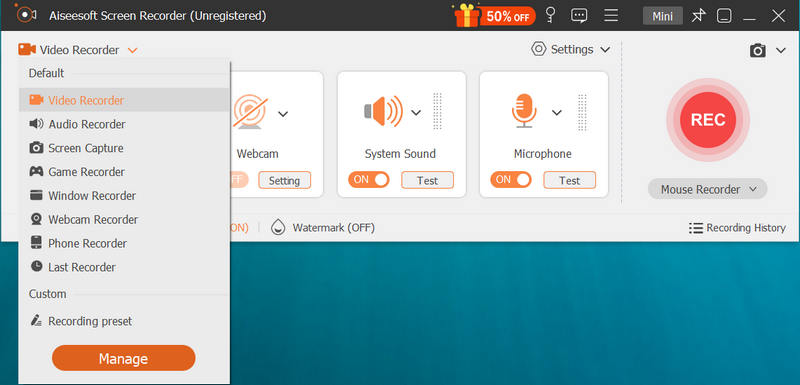
Além do gravador de áudio, ele oferece outras ferramentas para outras tarefas de gravação necessárias. Se você quiser gravar aulas onlineSeja para reuniões, jogos ou atividades ao telefone, o Aiseesoft é uma escolha de primeira linha.
Prós
Contras
Melhor para: Usuários de dispositivos móveis que desejam automatizar o processo de anotações e transformar facilmente palestras orais em documentos escritos.
Ponto:4.5/5
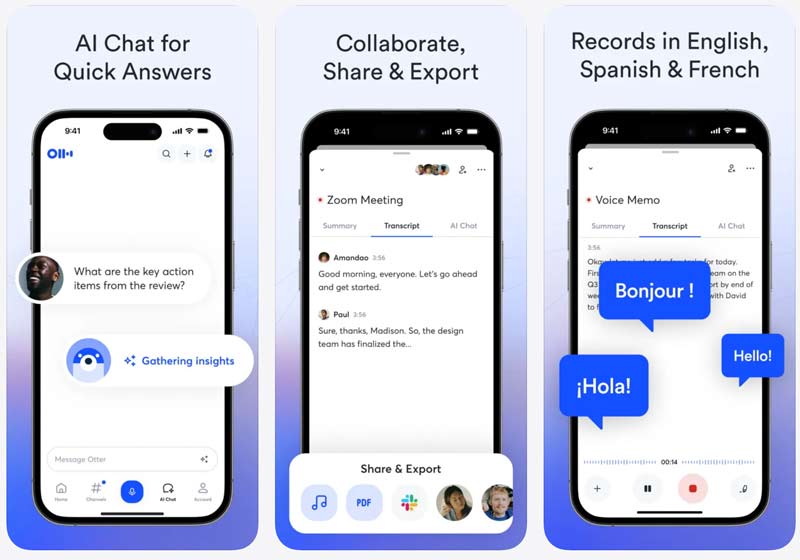
Otter.ai Este aplicativo foi projetado principalmente para transformar reuniões em resumos. Como um aplicativo de anotações e gravação de áudio com inteligência artificial, ele é amplamente utilizado por profissionais para reuniões e entrevistas. Além de gravar palestras, o aplicativo pode converter áudio em texto utilizável com precisão. Este assistente de IA pode ajudá-lo a obter facilmente anotações e resumos automatizados de reuniões. Se você deseja ter uma versão em texto pesquisável de uma palestra ou reunião, experimente o aplicativo.
Prós
Contras
Melhor para: Estudantes, aprendizes visuais e a maioria dos usuários de iPad que preferem escrever suas anotações de estudo à mão enquanto gravam o áudio da aula.
Ponto:4.7/5
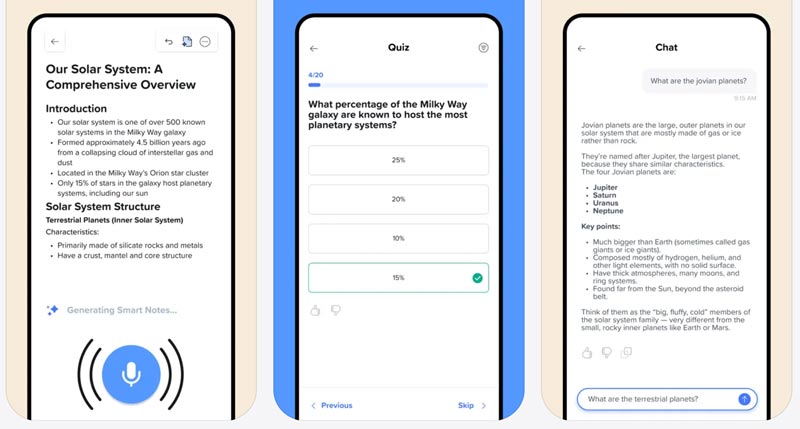
Notabilidade O Notability é um aplicativo popular de anotações com IA e PDF que permite gravar áudio, fazer anotações manuscritas, anotar documentos e muito mais. Para estudantes e pessoas que costumam fazer anotações manuscritas no iPad, é a ferramenta ideal para gravar aulas. É perfeito para usuários de iPad que utilizam o Apple Pencil. Como aplicativo de gravação de aulas, o Notability permite capturar aulas facilmente e obter transcrições de áudio instantâneas.
Prós
Contras
Observe que, se você só precisa fazer anotações casuais com o celular, aplicativos como o Notability são bastante poderosos. Você pode começar com o recurso integrado “Voice MemoUse o aplicativo “Gravador de Voz” ou “Acessório de Gravação de Voz” no seu iPhone ou Android para gravar aulas. Teste as capacidades de gravação e verifique se atendem às suas necessidades diárias.
Se você costuma ficar longe da pessoa que está falando e deseja capturar o som com clareza, recomenda-se o uso de um dispositivo dedicado. Em comparação com softwares, os gravadores de hardware possuem cápsulas de microfone especializadas, projetadas para capturar áudio nítido. Além disso, são mais estáveis e ideais para gravar palestras, reuniões ou entrevistas importantes.
Melhor para: Alunos que frequentam aulas presenciais em grandes auditórios e precisam de um dispositivo dedicado para gravar aulas sem se preocupar com a bateria.
Ponto:4.6/5
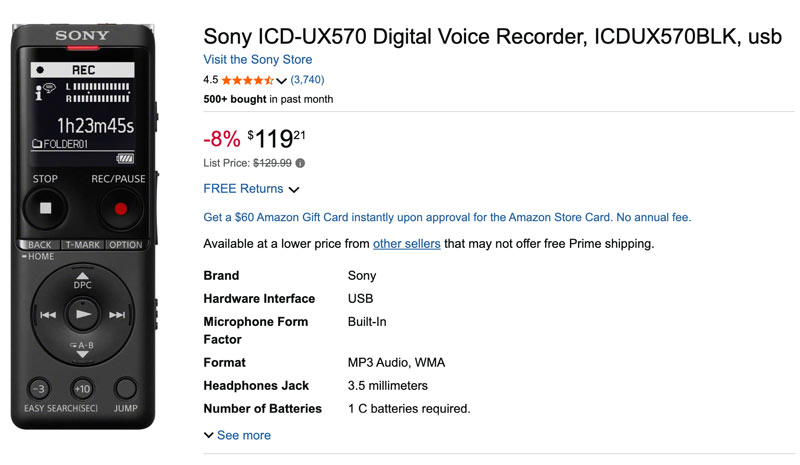
Gravador de voz digital Sony ICD-UX570 É uma escolha popular tanto para estudantes quanto para profissionais. O gravador é amplamente considerado o padrão ouro para gravar aulas. Ele foi projetado para ser incrivelmente fino e leve, o que garante que você possa levá-lo facilmente do bolso ou do estojo para gravações rápidas.
Prós
Contras
Melhor para: Estudantes, jornalistas e criadores de conteúdo que frequentemente gravam entrevistas, música, palestras, etc., e precisam da mais alta qualidade de som possível.
Ponto:4.3/5
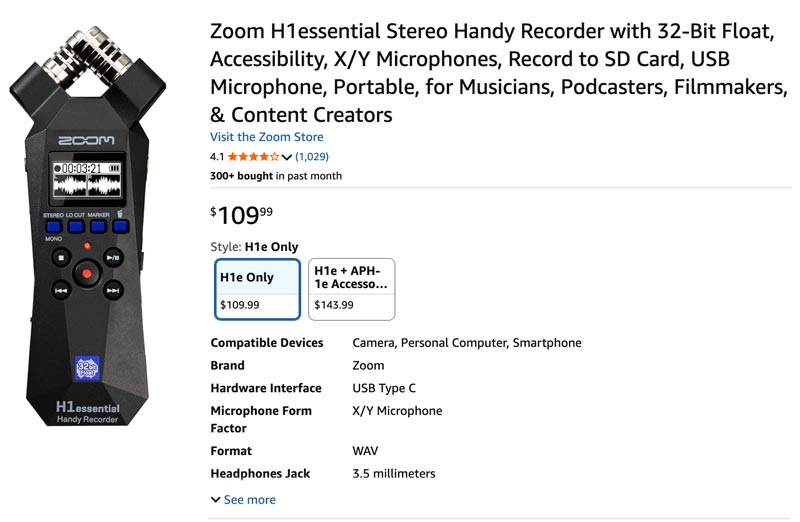
Gravador portátil estéreo Zoom H1essential Captura com alta qualidade tanto sussurros quanto gritos altos. Seu principal diferencial é a gravação em 32 bits float, que garante áudio nítido mesmo em ambientes ruidosos. Utiliza um microfone X/Y para capturar áudio limpo em até 120 dB SPL. A qualidade do áudio gravado é de nível profissional, superior à da maioria dos gravadores de voz convencionais. Além disso, permite gravar em um cartão SD com taxa de amostragem de até 96 kHz.
Prós
Contras
Pergunta 1. Qual a melhor maneira de gravar aulas para os alunos?
Como mencionado, você deve selecionar o gravador de aulas mais adequado com base no seu ambiente de aprendizado e objetivo específico. Se a aula estiver sendo exibida na tela do seu dispositivo, você pode usar um aplicativo de gravação para capturar o áudio do sistema diretamente. Se você usa seu celular ou tablet como principal ferramenta de estudo, um aplicativo de gravação de aulas pode integrar o áudio gravado às suas anotações. No entanto, se você costuma frequentar aulas presenciais, talvez precise de um gravador de voz dedicado.
Pergunta 2. O GoodNotes consegue gravar aulas?
Sim, você pode gravar aulas usando o aplicativo GoodNotes. Baixe o aplicativo e inicie um teste gratuito. Verifique se o recurso de gravação de áudio atende às suas necessidades específicas. A versão gratuita geralmente limita o tempo de gravação.
Pergunta 3. Posso usar o ChatGPT para gravar aulas?
O ChatGPT pode ajudar você a transformar transcrições brutas em anotações estruturadas. Seja em um laptop ou em um celular, você deve gravar as aulas primeiro e depois deixar o ChatGPT fazer a transcrição e a análise.
Conclusão
Muitos gravadores de palestras Existem diversos gravadores de vídeo disponíveis no mercado para gravar aulas e fazer anotações. Você pode encontrar facilmente o gravador de vídeo ideal entre as nossas recomendações. A escolha perfeita depende muito do seu principal objetivo. Se você precisa gravar aulas online, reuniões ou seminários virtuais com frequência, um software para computador como o Aiseesoft Screen Recorder oferece a captura de áudio mais confiável. Para aulas presenciais ou entrevistas importantes, um gravador de áudio dedicado como o Sony ICD-UX570 pode capturar o áudio com clareza.
 Análise completa do OBS Screen Recorder: Recursos, vantagens e guia.
Desbloqueie todo o potencial do OBS Screen Recorder com nossa análise detalhada e guia de uso Passo a Passo. Aprenda sobre seus recursos gratuitos, porém poderosos, e encontre ótimas alternativas.
 4 melhores maneiras de gravar áudio do navegador (online/desktop/extensão)
Como gravar áudio de navegadores, Chrome, IE ou Safari? Qual é o melhor gravador de áudio para navegadores? Aqui estão 4 excelentes gravadores de áudio para ajudar você a capturar áudio de um site.
 Avaliação do Mediasite Recorder e Melhor Alternativa do Mediasite
O que é o Mediasite? Como faço para baixar vídeos do Mediasite? Como uso o Mediasite Desktop Recorder? Esta postagem fornece uma revisão detalhada do Mediasite Recorder e compartilha uma ótima alternativa do Mediasite para gravar qualquer atividade no computador.
Gravar tela do iPhone
1.1 Gravador de tela do iOS1.2 Gravar tela do iPhone1.3 Ver tela do iPhone1.4 Espelho de tela do iPhone
O Aiseesoft Screen Recorder é o melhor software de gravação de tela para capturar qualquer atividade, como vídeos online, chamadas de webcam, jogos no Windows/Mac.
100% seguro. Sem anúncios.
100% seguro. Sem anúncios.

*Campo obrigatório
*Por favor, insira um e-mail válido