Conteúdo
I want to uninstall WhatsApp messages from my iPhone SE and replace it with WeChat to contact my business partner in China conveniently. Before doing that, how can I back up my important WhatsApp messages?
WhatsApp is widely used for personal and business communication. Backing up your WhatsApp messages, including chats, voice notes, videos, and attachments, is important to prevent data loss. This guide will show you 6 simple and safe ways to back up WhatsApp on your iPhone using iCloud, Email, AirDrop, iTunes, and professional tools.
O primeiro método de transferência de mensagens e anexos do WhatsApp para o computador é usando WhatsApp Transfer para iOS. It is a professional application to send WhatsApp chat history from all the contacts and groups from an iPhone to a computer. Moreover, it can also back up all WhatsApp texts, voice messages, and attachments from one iPhone to another iPhone in a 1:1 copy. What you need is a USB cable, and download this WhatsApp backup software. This software supports iPhone 16, 15, 14, 13, 12, 11, XS, XR, X, 8, 7, 6, 5, etc., running In iOS 18/17 and later, and you can use it to transfer WhatsApp data from almost all iPhone models.
Downloads
 100% seguro. Sem anúncios.
100% seguro. Sem anúncios.
Observação: Unlock your iPhone and tap Confie neste computador if prompted. Wait until the software successfully detects your device.
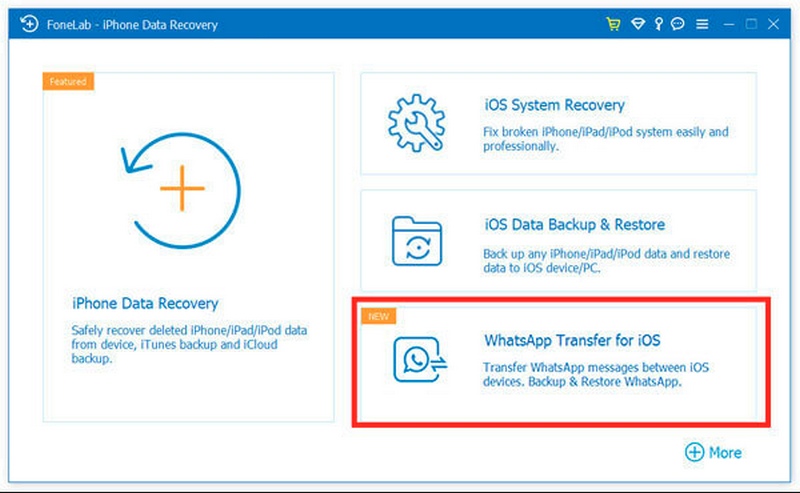
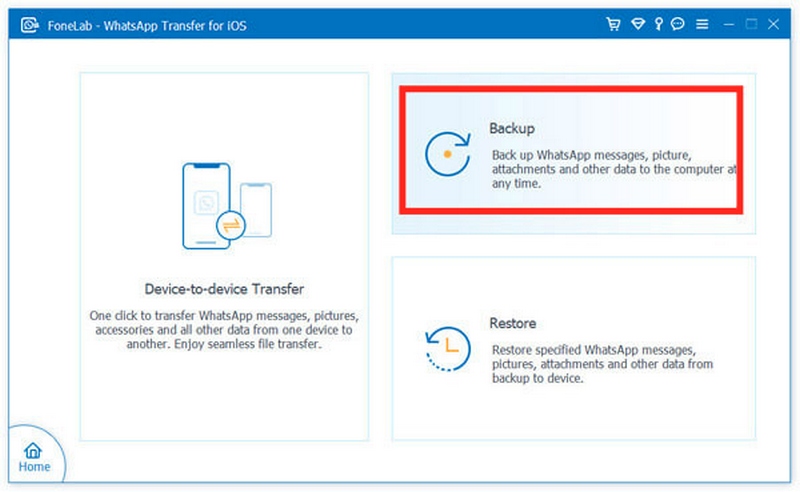
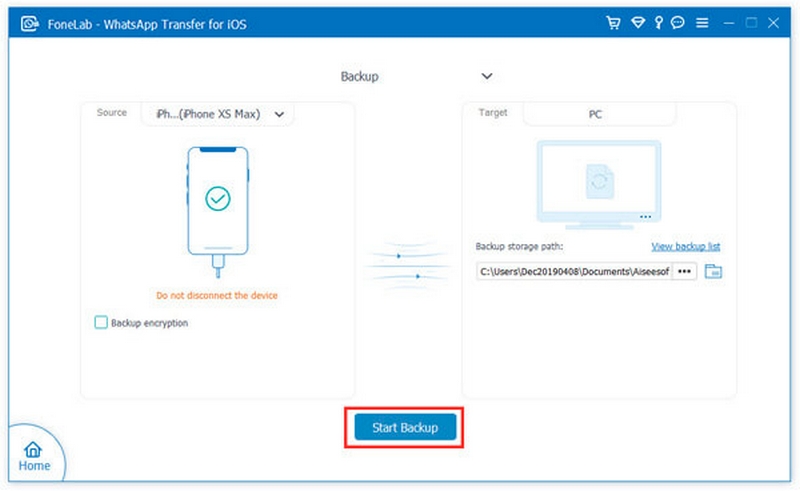
Da próxima vez, quando você quiser restaurar backup do WhatsApp, este software também pode ajudá-lo a restaurar todos os dados do WhatsApp do PC para o iPhone convenientemente.
WhatsApp cooperates with Apple, so it will definitely gain the superiority in some aspects. Here, WhatsApp messages backup on iPhone can be done with WhatsApp itself. What you need is an iCloud account and a WLAN.
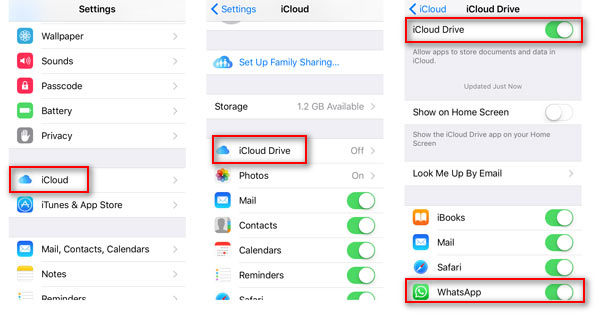
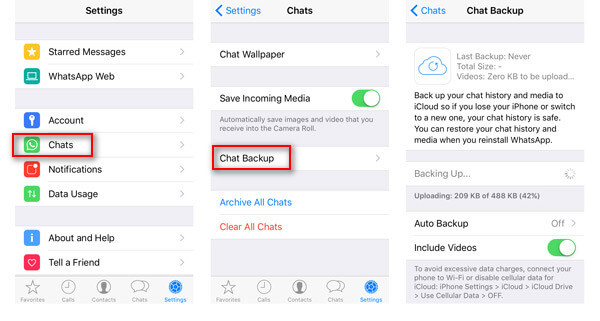
If you like, you could turn on Include Videos to back up WhatsApp videos for restoring in future. Also you are allowed to slide Auto Backup ON to make WhatsApp messages and videos automatically.
Veredito
iCloud Drive is the official and easy way to back up WhatsApp on iPhone. It allows wireless automatic backups, but requires sufficient iCloud storage and a stable internet connection.
O backup do WhatsApp está travando no iPhone? Aqui estão as soluções.
Also, you can restore WhatsApp by uninstalling it. And then you need to install WhatsApp, log in to your WhatsApp using your original account. Once you sign in to WhatsApp, you will be asked to restore the backup from iCloud. Surely, the restored backup from iCloud will overwrite the existing WhatsApp files on the iPhone.
Apart from the above two methods, there is another method to copy WhatsApp messages from iPhone to PC with Emails. What you must prepare is the WLAN and your Email address. Apart from the above two methods, there is another method to back up WhatsApp messages from iPhone to PC with Emails. What you must prepare is the WLAN and your Email address.
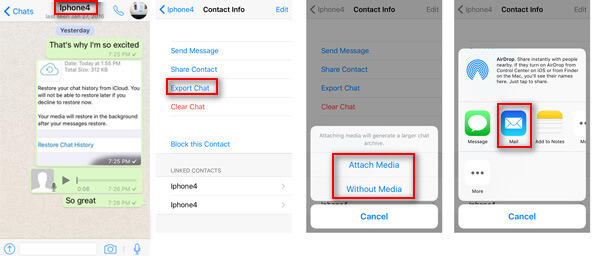
In this way, you will find your WhatsApp messages will be saved as TXT after logging in with your Email address on the computer. However, you will find it is a little troublesome to export WhatsApp messages one by one for each contact person.
Veredito
Email lets you save individual chats as TXT files. It’s convenient for small backups but not suitable for full WhatsApp restoration.
iPhone users may not miss one of the important tools, AirDrop, which is also a helpful program for transferring files between iOS devices and Macs. Here we will show you the detailed steps to Airdrop mensagens do WhatsApp ou outros arquivos entre iPhone e Mac.
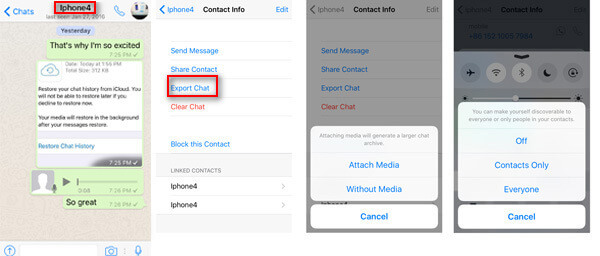
Not only are WhatsApp messages, contacts, photos, etc., but they are also supported by AirDrop. Check here to know como fazer backup de contatos no iPhone com AirDrop.
Veredito
AirDrop is fast for saving WhatsApp chats to a Mac, ideal for individual conversations, but cannot restore them to WhatsApp.
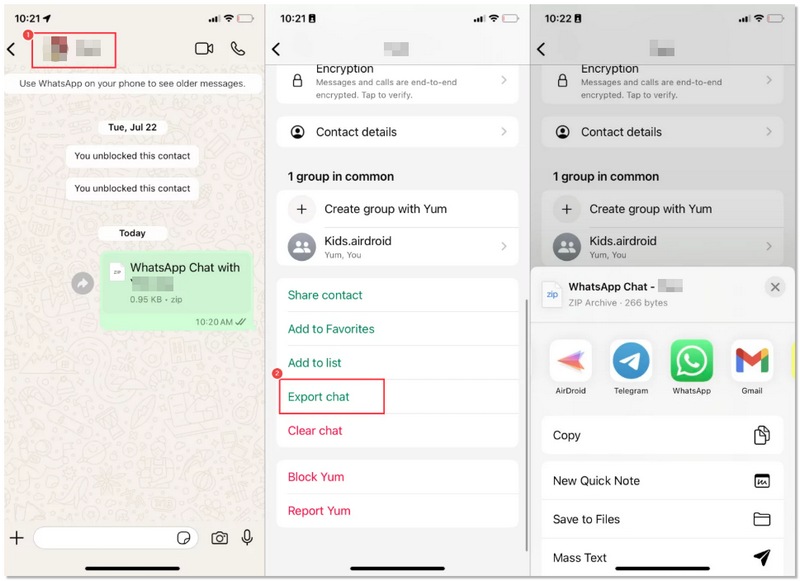
If backing up all your WhatsApp data is not in your plan, the built-in Export Chat feature can be a good and very handy option. With this method, you can take out individual chats straight from your iPhone without the need for a computer or iCloud backup. It is excellent for cases where you only want to keep some of the chats that are important in a file, for your records, or for legal and business purposes.
Veredito
The Export Chat tool is ideal for swiftly and effortlessly preserving particular discussions. It doesn’t need iCloud storage, iTunes, or third-party apps. Still, exported chats can’t be brought back to WhatsApp. They are merely kept as text files. So, if you want to do simple documentation or maintain a record rather than have a complete restoration, this way is among the easiest and most versatile options on the iPhone.
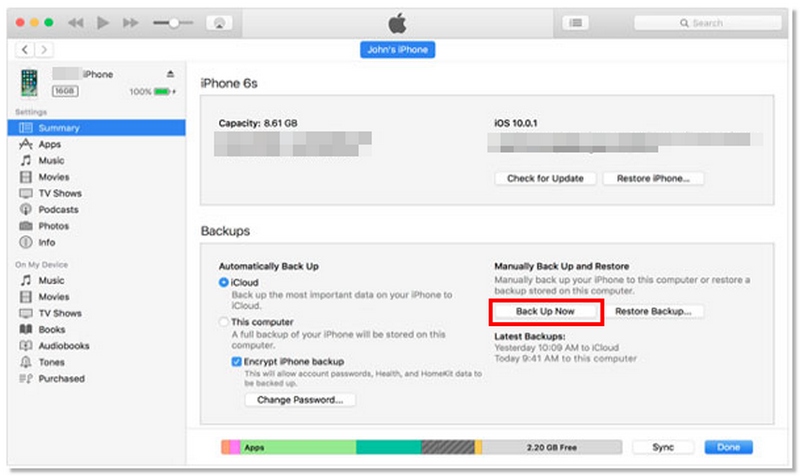
For iPhone users who like to have their backups stored offline, iTunes is a dependable tool to create a backup of WhatsApp messages and iPhone data in general. This approach causes chats, media files, and app configurations to be stored on your computer. Although it is not possible to make a selective WhatsApp backup with this method, it is handy if you want to do a complete device backup that can be restored later either to the same or a new iPhone.
Veredito
iTunes offers a secure offline backup of your entire iPhone, including WhatsApp. It’s perfect for full device restoration but cannot back up individual chats.
Como restaurar mensagens excluídas do WhatsApp sem backup?
You need a backup to restore deleted messages and then transferir WhatsApp do iPhone para o Android or other devices. Without a backup, use third-party tools like FoneLab iPhone Data Recovery.
Como faço para acessar o WhatsApp no meu iCloud?
All the backup via iCloud will be stored in the cloud by Apple. Log in to www.icloud.com, and you can view some data from the backup file. As for WhatsApp messages, iCloud does not allow you to view them directly. You need an extrator iCloud para acessar os dados do WhatsApp.
O Move to iOS pode transferir o WhatsApp?
Não. O Move to iOS é um aplicativo gratuito para transferir dados do telefone Android para o iPhone. No entanto, dados de aplicativos como WhatsApp, Kik, etc., não são suportados para enviar do Android para o iPhone.
O WhatsApp está vinculado ao ID Apple ou ao número de telefone?
A conta do WhatsApp está vinculada ao seu número de celular. A conta em si não está associada a um ID Apple. No entanto, se quiser fazer backup de suas mensagens do WhatsApp via iCloud, você deve certificar-se de que seu dispositivo esteja conectado com o mesmo ID Apple.
Você pode enviar mensagens do WhatsApp via AirDrop entre dispositivos com o mesmo ID Apple?
Yes. Files are automatically received on the target device without needing manual acceptance.
Conclusão
It is very important to back up WhatsApp on the iPhone in order to have the protection of chats, media, and voice notes. Each method offers a certain plus and a certain negative side: Aiseesoft WhatsApp Transfer, iCloud, AirDrop, Email, Export Chat, and iTunes. Selecting the most suitable method would guarantee a successful WhatsApp backup for iPhone and thus secure your valuable data.
 [Maneira comprovada] Recuperação do WhatsApp no iPhone (mensagens/fotos/vídeo/áudio)
Como obter a recuperação do WhatsApp no iPhone? Aqui, pegue o melhor software de recuperação do WhatsApp para recuperar mensagens, fotos, videochamadas, mensagens de voz e anexos agora mesmo.
 Aprenda a importar e sincronizar contatos do WhatsApp entre dispositivos
Está se perguntando por que seus contatos do WhatsApp não estão sincronizando? Aprenda como corrigir problemas de sincronização, mesclar dados de contatos e importar contatos no Android e no iPhone.
 A melhor maneira de recuperar dados excluídos do WhatsApp no Android
Se você deseja recuperar vídeos e imagens excluídos no WhatsApp do Android, siga este guia para recuperar fotos e vídeos excluídos do backup ou sem backup. É muito simples.
Uma ferramenta eficiente de transferência do WhatsApp que faz backup e sincroniza rapidamente todos os bate-papos, vídeo/áudio, arquivos, adesivos e muito mais do WhatsApp em dispositivos iOS/Android e serviços de nuvem online.
100% seguro. Sem anúncios.

*Campo obrigatório
*Por favor, insira um e-mail válido