Recuperação de dados do iPhone
 100% seguro. Sem anúncios.
100% seguro. Sem anúncios.
TL; DR:
Voicemail is a crucial feature that captures important messages when you can't answer your phone. Losing an essential voicemail from your iPhone may cause frustration for you if it holds information about your job, your family or important verification details. You may accidentally delete the messages or lose them due to a system crash. Do not panic! There are five efficient methods through which you can recover your deleted voicemails from iPhone.
| Métodos de Recuperação | Mais Adequada Para | Requires Backup? | Overwrite Current Data? | Success Rate / Recommendation |
| Deleted Folder | Recently deleted voicemails | Não | Não | ⭐⭐⭐ (High, but time-limited) |
| Recuperação de dados do iPhone | Voicemails lost over 30 days, system crash, or having no backups | Não | Não | ⭐⭐⭐⭐⭐ (Highest & Safest) |
| iCloud backup | Users who have auto iCloud backup enabled before the deletion. | Sim | Sim | ⭐⭐⭐ (Medium, risks data loss) |
| iTunes / Localizador | Users who regularly back up their iPhone to a computer. | Sim | Sim | ⭐⭐⭐ (Medium, risks data loss) |
| Operador de contato | A final attempt when all self-recovery methods fail. | Não | Não | ⭐⭐ (Low, varies by carrier) |
Yes, there are many different solutions for lost voicemails, you can recover deleted voicemails on iPhone with Apple built-in Deleted Voicemails folder, like the Recently Deleted album in Photos. Besides, the native iOS backup function-iCloud and third party recovery tools can also help to restore the lost voice messages.
However, recovery success depends on several factors:
1. How long you have deleted or lost voicemail
2. Whether your carrier still stores voicemail data
3. Whether you have an iCloud or computer backup
4. If new data has overwritten the deleted voicemail
The factors above will determine the success rate of your recovery and which method you should choose. Let’s dive into the details.
It is one of the simplest and quickest methods to retrieve lost voicemails. Similar to photos, videos and regular messages, deleted iPhone voicemails are also stored in a special location before being finally deleted.
Get Back the Deleted Voicemail from the Deleted Folder
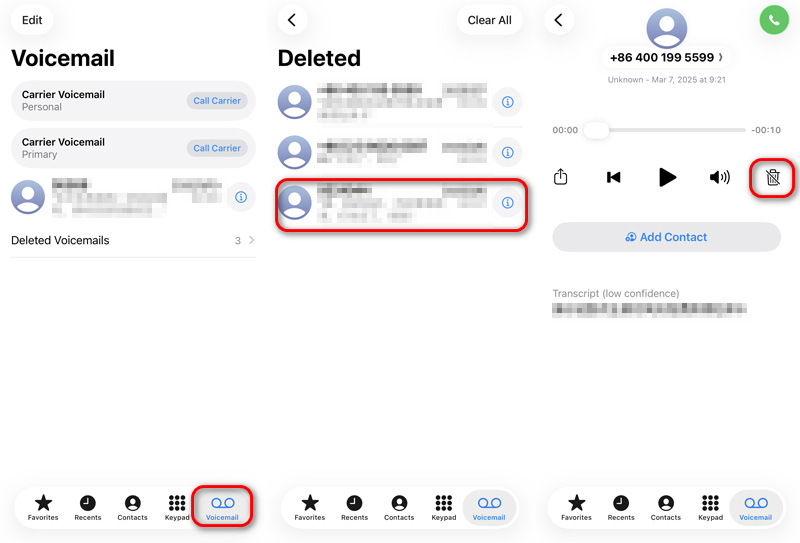
Veredito: Recover deleted voicemail from the Deleted Voicemails folder takes less than 5 seconds. But it may take you a while to find the voicemail you need one by one. Generally, the Deleted Voicemails folder will keep the deleted voicemail for 30 days (varies from specific cellular carriers). For voicemail not in this folder and lost voicemail due to system error or data loss, this method may not work.
If your voicemail is older than 30 days and it is not located in the Deleted Voicemails Folder, then Recuperação de dados do iPhone Aiseesoft FoneLab is an appropriate option for scanning the lost or deleted voicemail data from your device. It supports voicemail recovery without requiring an existing backup. You can scan and recover the deleted and lost voicemails even over 30 days.
Downloads
FoneLab - Recuperação de Dados para iPhone
100% seguro. Sem anúncios.
100% seguro. Sem anúncios.
Scan and Recover Lost Voice Message with FoneLab
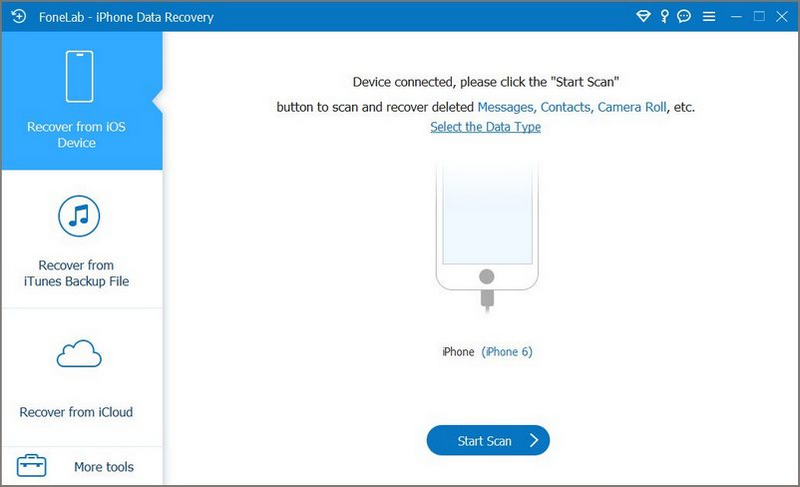
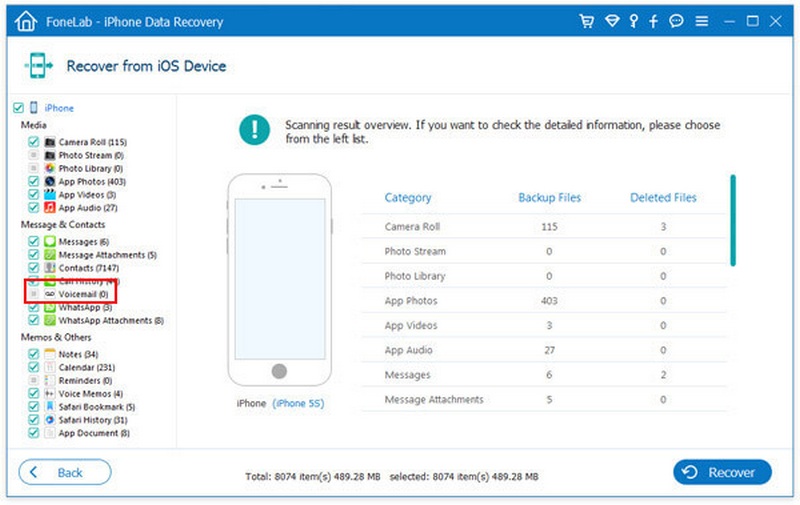
Veredito: Compared with restoring a full backup, this method feels much safer because you can recover only the voicemail files you need. And it can find voicemail and other data lost for system error, update error etc. more than just deletion. However, with the large storage space and lots of files stored on your device, scanning process might require more time. For example, my iPhone 14 Pro with 417GB storage capacity requires 10 minutes for completion.
If your voicemail existed before the latest de backup iCloud was created, restoring the backup may help recover it. But this method erases your current iPhone data and replaces it with backup data. If newer files are important to you, create a fresh backup first.
Restore iPhone to Recover Voicemail from iCloud
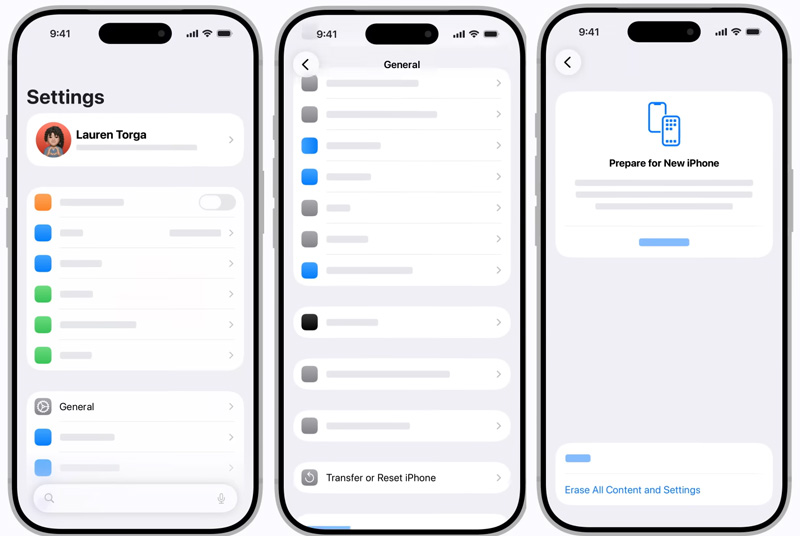
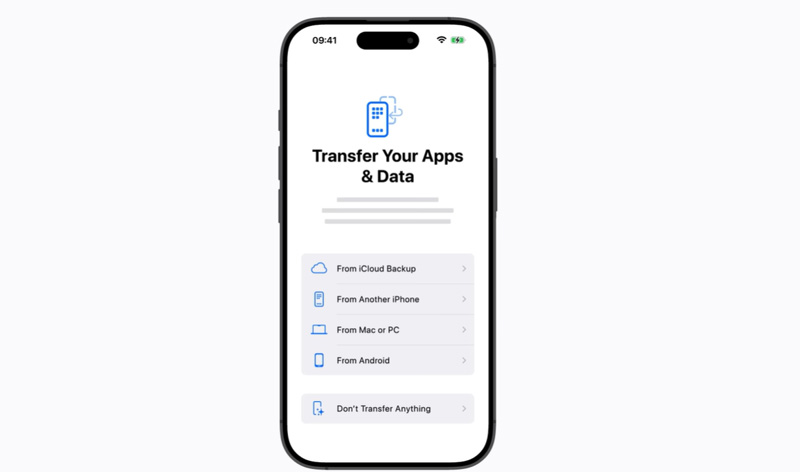
Veredito: This method is recommended if the voicemail is extremely important and you already know it exists in the backup. The whole resetting process takes about 15-20 minutes and there may be possible data loss and overwriting.
Se você fez backup do seu iPhone to a computer, you may recover deleted voicemails using iTunes (Windows or older macOS) or Finder (macOS Catalina and later).
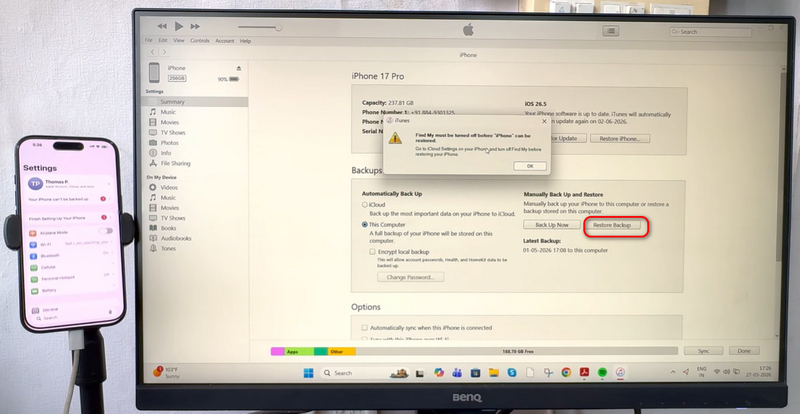
Veredito: This method can work well if you regularly create local backups. In some cases, computer backups are even more complete than iCloud backups.
The downside is the same as iCloud restoration: your current iPhone data gets replaced by older backup data.
Some mobile carriers temporarily store voicemail data on their servers, even after deletion. If the voicemail was deleted recently, customer support may still be able to restore it.
Just Contact your carrier’s customer support. And explain when the voicemail was deleted and more details if need. Follow the instruction they provide.
The success rate varies greatly from different carriers. It can be your last try if no other methods work.
Can messages deleted forever be recovered?
Sometimes. This can be done if the messages were not overwritten yet and some recovery software was used to get back the voicemail from the phone.
Does a hard factory reset delete voicemails forever?
If no backup exists for it, then the factory reset will permanently erase voicemails because the messages' data would have been erased and overwritten during it.
How can deleted voicemail be recovered if there is no backup?
There is special software, such as Aiseesoft FoneLab iPhone Data Recovery, which is able to scan and retrieve the voicemail from the device even without a backup.
Why is there no Deleted Voicemails folder visible?
If the carrier does not support recovery, it can be impossible to access the Deleted Voicemails folder through visual voicemail feature anymore.
Conclusão
É possível recover lost voicemails from your iPhone much faster than expected. For starters, there is the Deleted Voicemails option which works quickly and safely. Secondly, recovery applications such as Aiseesoft FoneLab give perhaps the safest means to recover lost voicemail messages, but they do not require full device restoration. Finally, when time passes, it becomes possible to look for vital information about voicemails in the iCloud Backup, iTunes Backup, or even your cellular network provider.
The faster you perform these actions, the higher chances you have to retrieve the lost voicemail message.
 Esqueceu a senha do correio de voz? Redefina-a no Android e no iPhone.
Esqueceu a senha do seu correio de voz? Redefina ou altere-a no seu iPhone ou dispositivo Android da AT&T, Verizon, Sprint, T-Mobile, etc., nesta página.
 Como transferir correio de voz do iPhone para o computador (PC/Mac)
Como transfiro correio de voz do iPhone para o computador? Leia este artigo e obtenha o melhor método para transferir correio de voz do iPhone para o computador.
 10 razões pelas quais o correio de voz do iPhone não funciona e maneiras completas de corrigi-lo
Isso acontece por vários motivos sempre que o correio de voz do iPhone não funciona. Escrevemos este artigo para abrir seus olhos para os possíveis motivos e maneiras de corrigir isso.
correio de voz do iPhone
Corrigir correio de voz não será excluídoCorrigir o correio de voz do iPhone que não funcionaRecuperar correio de voz excluído no iPhone
O melhor software de recuperação de dados do iPhone de todos os tempos, permitindo que os usuários recuperem com segurança os dados perdidos do iPhone/iPad/iPod do dispositivo iOS, backup do iTunes/iCloud.
100% seguro. Sem anúncios.
100% seguro. Sem anúncios.

*Campo obrigatório
*Por favor, insira um e-mail válido