conteúdo
WhatsApp is a leading cross-platform, encrypted messaging app used by millions of users. Samsung users need to share everything from daily texts to high-quality media like photos and videos. However, despite its convenience, WhatsApp can also bring trouble sometimes. Like other social apps and platforms, data loss remains a common frustration.
Whether you have accidentally deleted a chat or lost your entire history like Maggie, there is no need to panic. This guide shares five efficient methods to help you recover deleted WhatsApp chat history on Samsung. You can either restore from an existing cloud/local backup or use professional data recovery software.
| Forma | Mais Adequada Para | Prós | Contras | Requisito chave |
| Google drive | Restoring the most recent backup. | Official way to restore WhatsApp chat history. | Only keeps one backup. | Recent Google Drive backup. |
| Backup local | Recovering WhatsApp messages deleted within the last 7 days. | Sem internet necessária. Works without a Google account. | Limited to a 7-day window. Overwrites app data. | Backup exists in the phone storage. |
| Data Recovery Android | Retrieving WhatsApp chats when no backup exists. | No backup needed. Can recover overwritten data. | Not 100% guaranteed. | Um computador Windows ou Mac. |
| Samsung Switch Inteligente | Full-phone restore, including existing WhatsApp chat history. | Official Samsung tool. Restores much more than just WhatsApp. | Unreliable for WhatsApp recovery from PC backup. | Two Samsung devices for transfer. |
| Google Fotos | Recovering deleted photos/videos from WhatsApp chats. | Automatic cloud backup for media. | Only for media files, not text messages. | Media backup was enabled. |
If you have set WhatsApp to automatically back up your chats, media, and settings daily, weekly, or monthly, you can easily restore your deleted chats from Google Drive. This is the most straightforward method if you have a suitable cloud backup.
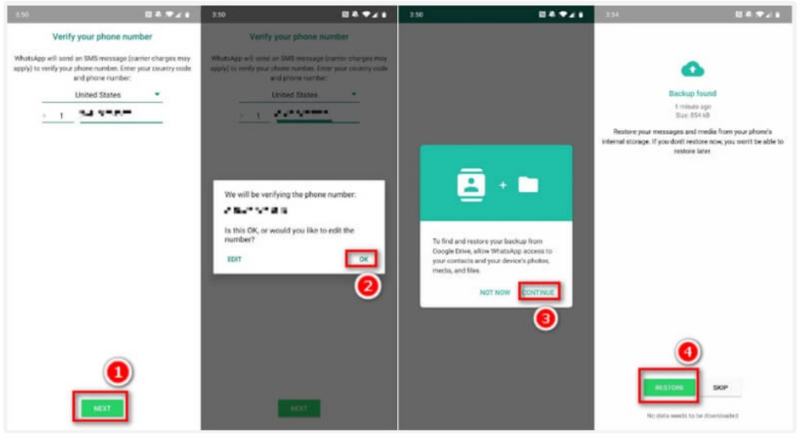
Google Drive only stores one backup per phone number. New backups will overwrite old ones. Considering that, this method is ideal for restoring your most recent chats. Some older, overwritten chats won’t be retrieved.
WhatsApp will automatically create a local backup of your chats every night at 2:00 AM and store it in your Samsung phone’s internal memory or cartão SD. You can check the local backup to find recently deleted chats without the cloud.
If you use an older Android version, you may only need to tap Internal Storage > WhatsApp > Databases.
What if you fail to find the target WhatsApp chats from the recent backup, or you don’t have a backup file to restore? This is where third-party Android data recovery software becomes essential.
Here, we sincerely recommend the powerful Recuperação de dados do Aiseesoft Android for you to get the job done. Besides deleted WhatsApp chat history, it can recover other files like contacts, call logs, text messages, videos, audios, pictures, and more. The following will be the step-by-step guides:
 100% seguro. Sem anúncios.
100% seguro. Sem anúncios.
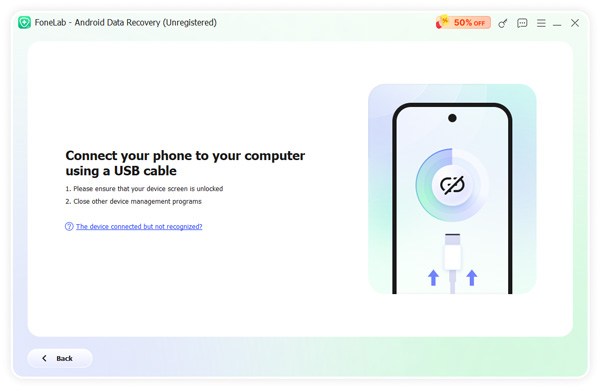
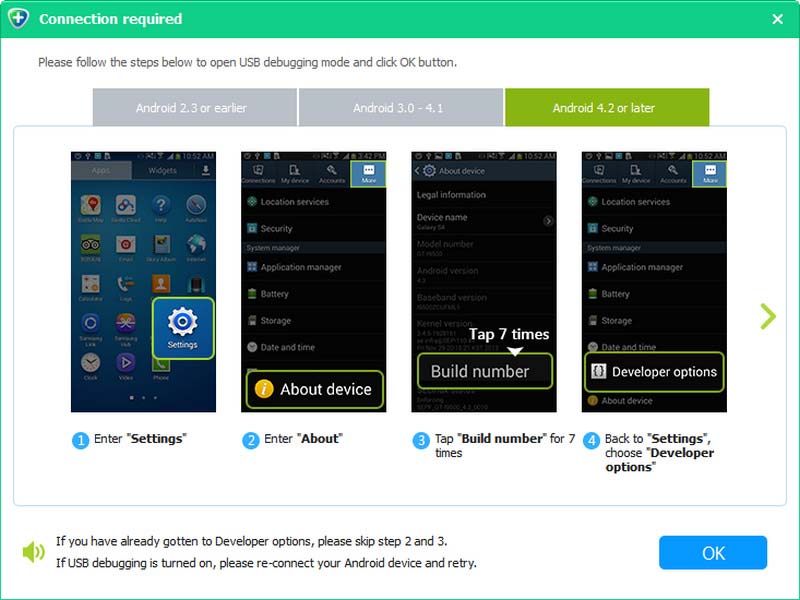
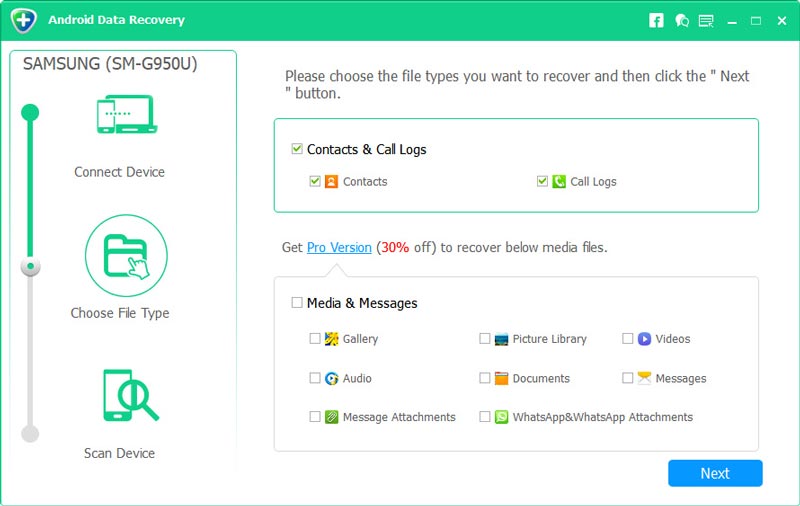
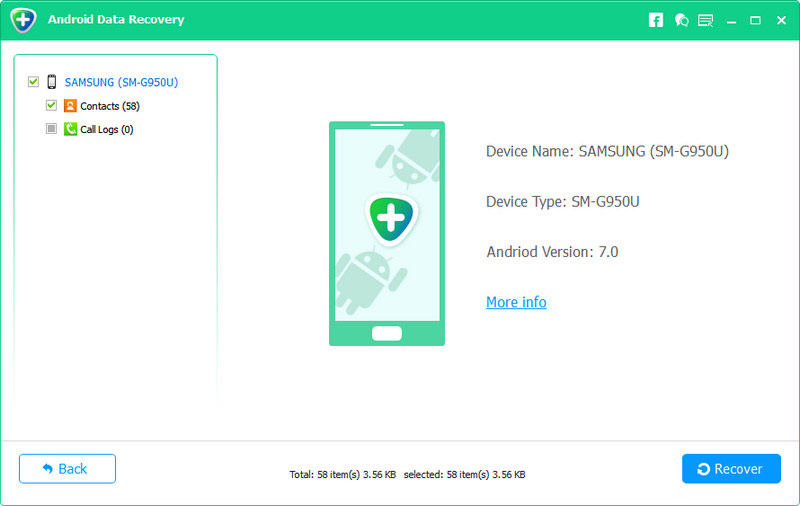
The software will get back your deleted chat history on WhatsApp. It will open the folder where the recovered data is saved automatically, and you can check it easily.
With simple clicks, you can handily recover your Samsung WhatsApp history. With the same method, this Samsung recovery tool could also help you recover other files, including contacts, text messages, call logs, videos, photos, and more. To avoid all the trouble of accidental deletion, you could also use it to back up your Samsung phone regularmente.
Samsung Switch Inteligente is an official tool for backing up and restoring entire device contents, including settings, apps, and media. Many Samsung users use it to back up their entire phone to a computer. If you have created a full backup of your phone recently, your WhatsApp chat history may be inside that backup file.
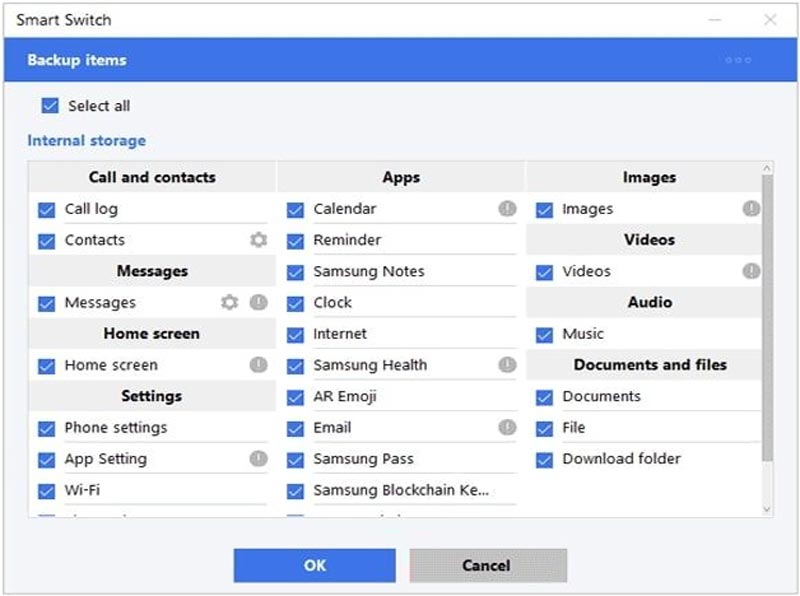
Note that this method has a critical limitation for WhatsApp recovery. Smart Switch is designed for full-device backup and restore, not for restoring individual apps. Your files created on third-party messenger apps like WhatsApp might not be transferred via it.
Sometimes, your WhatsApp chat history is recovered, but the photos and videos within conversations are missing or won’t be opened/saved. To retrieve these WhatsApp media files, you can try restoring from Google Photos.
If you had Google Photos backup enabled on your phone, these deleted WhatsApp media might be saved there. Ensure you have signed into the same Google account on your Samsung phone and open the Google Photos app. View your backed-up photos and search for those from WhatsApp.

Question 1: How do I get WhatsApp photos save to my gallery automatically?
To ensure your future WhatsApp photos save to your gallery automatically, you can open WhatsApp, go to “Settings”, tap “Storage and data” > “Media auto-download”. Set when photos and videos are automatically saved to your phone based on your needs.
Question 2: Why are WhatsApp photos not saving to Google Photos?
Check and ensure Google Photos backup is active. Open the Google Photos app, tap your profile, go to Photos settings, and ensure “Back up & sync” is ON. Then, ensure you look for these WhatsApp media in the right folder. What’s more, you should grant the Google Photos app the necessary permissions to access and store your WhatsApp images.
Question 3: Can I recover WhatsApp messages I deleted over a month ago?
It is challenging to retrieve WhatsApp messages deleted over a month ago. It is generally impossible to use the standard Google Drive and local backup methods, as backups are regularly overwritten. Your best chance is using a professional third-party data recovery tool like Android Data Recovery. It can help you find and recover deleted WhatsApp chats through a deep scan.
Conclusão
Nós falamos principalmente sobre how to recover deleted WhatsApp chat history on Samsung in this post. Whether you have a suitable cloud/local backup or not, there are still ways to get your lost data back. The key to avoiding WhatsApp data loss is regular, consistent backups. You should often check your Google Drive backup settings in WhatsApp. Moreover, consider occasional manual WhatsApp backups before some major phone changes. If you have any other methods to restore deleted WhatsApp messages from Samsung phones, please leave us a message.
 Como faço backup completo do meu Samsung
Para evitar a perda de dados do seu Samsung, sugerimos que você faça backup do Samsung com frequência.
 Como recuperar contatos do Android excluídos
Você pode aprender aqui como recuperar seus contatos excluídos no Android.
 Como Recuperar Imagens e Vídeos do WhatsApp do Android
Leia este artigo para recuperar facilmente suas fotos e vídeos do WhatsApp do Android.
Recupere o WhatsApp
Recuperação WhatsAppRecuperar Mensagens Deletadas do WhatsAppRecuperar bate-papo excluído do WhatsAppRecuperar mensagens do WhatsApp AndroidRecuperar histórico de bate-papo do WhatsApp SamsungRecuperar vídeos/imagens do WhatsApp AndroidRestaurar mensagens do WhatsApp no novo iPhoneRestaurar WhatsApp do Google Drive para iPhoneBackup e restauração do WhatsAppRestaurar WhatsApp do iCloud
O melhor software de recuperação de dados do Android para recuperar arquivos excluídos como SMS, contatos, registros de chamadas, documentos, etc. do telefone/cartão SD/tablet Android no Windows/Mac.
100% seguro. Sem anúncios.
100% seguro. Sem anúncios.

*Campo obrigatório
*Por favor, insira um e-mail válido