
Aiseesoft Screen Recorder
 100% seguro. Sem anúncios.
100% seguro. Sem anúncios.
What is the best Clash of Clans screen recorder?
For Clash of Clans players, there are many war attacks, base layouts, and other gaming moments that need to be recorded. CoC replay recorder is also a valuable tool for improvement. Whether for analyzing raids, creating tutorials, or simply sharing content, high-quality gameplay recording is essential.
This guide helps you quickly select the right recorder to capture your gameplay, explaining several core requirements for a great Clash of Clans screen recorder. Moreover, several strong contenders are recommended for recording on PC, iOS, and Android.
You should select a suitable recorder based on your meta específica. For instance, some players may want to record raids and war attacks for analyzing, some want to create base-building tutorials, and some want to capture content for sharing.
Recording Clash of Clans directly on your phone is the most straightforward method. Whether you play Clash of Clans on an Android phone or an iPhone, you can start with the built-in recorder to capture your gameplay.
iOS comes with a built-in recording feature that can capture your gameplay on Clash of Clans with high quality.
When you want to start recording, display the Centro de Controle de e escolha o Gravação de tela icon. After a 3-second countdown, your iPhone or iPad screen will be recorded. So, you should switch to Clash of Clans quickly for recording.
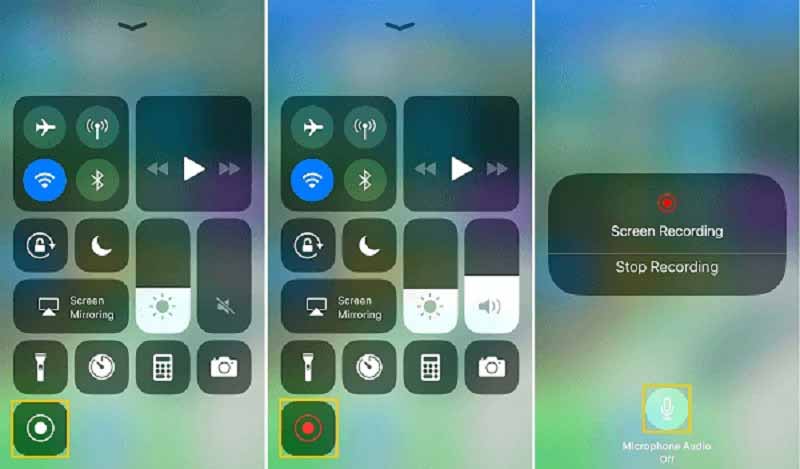
If you want to capture sound, press and hold the Screen Recording icon to turn on the Microfone. Note that iOS devices only allow recording audio from the microphone. The built-in recorder cannot capture internal sound. Want to record system audio on iPhone? Clique aqui.
For Android users, you can also record Clash of Clans with the built-in recorder. Like iOS devices, most modern Android phones have a related recording tool.
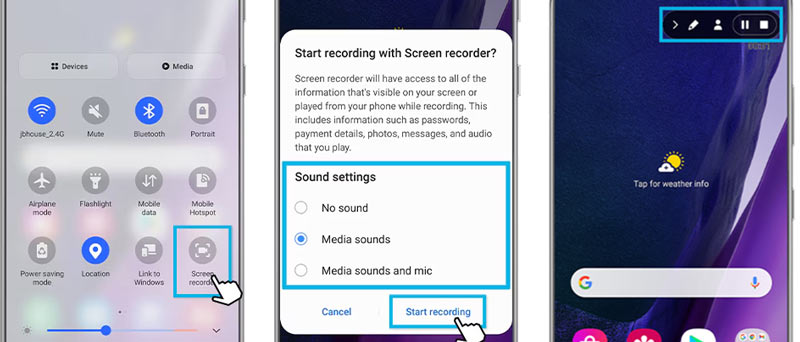
If you are using a Samsung Galaxy or Google Pixel phone, open your Configurações rápidas panel, and then locate and tap a Screen Recorder or Capture tile. Read this guide to learn how to record screens on Samsung phones.
You will get options to record sound and adjust other settings. Play your game and tap Comece a gravar.
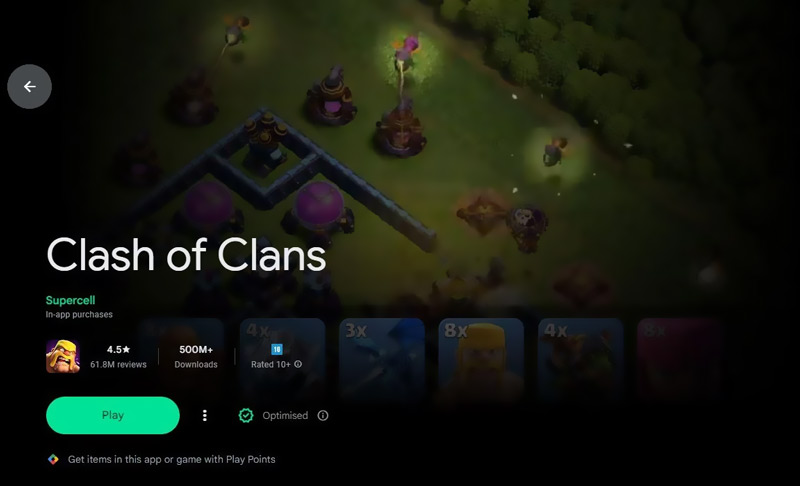
Besides the built-in recorder on your phone, you can use the Google Play Games app to capture your gameplay. Open the app, search for Clash of Clans, and then tap the Jogabilidade recorde button on the game’s page.
Besides the built-in solutions, you can turn to dedicated screen or game recorders for Clash of Clans and other mobile games. When you are unsatisfied with the built-in options, go to the app store of your phone to search for powerful recorders with more advanced features.
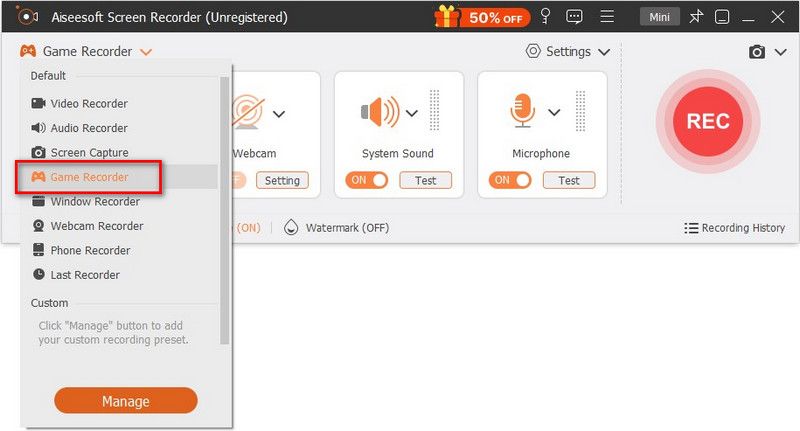
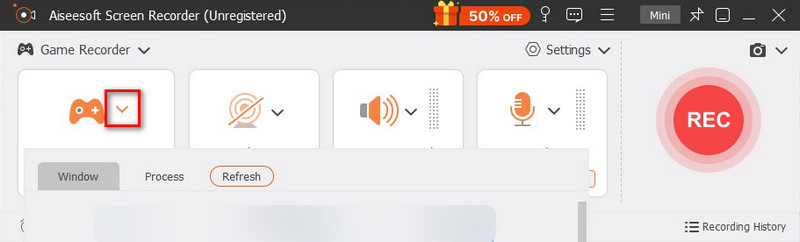
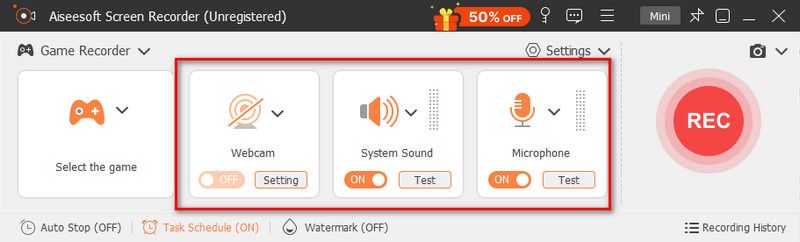
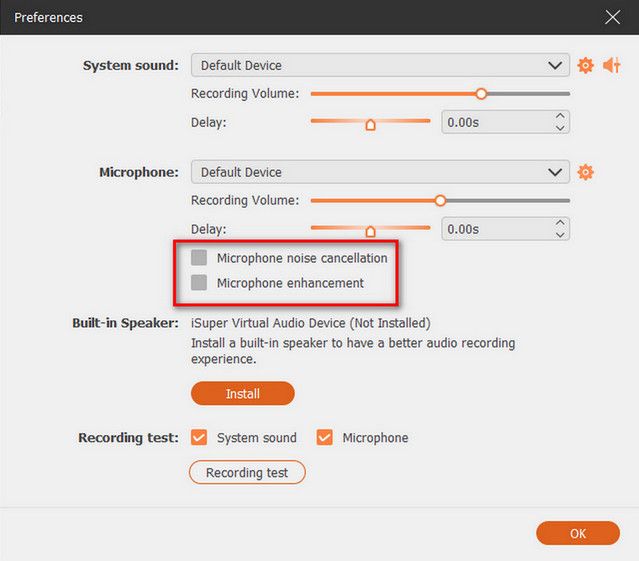
If you play Clash of Clans on a PC via an Android emulator, you can rely on dedicated game recording software like Aiseesoft Screen Recorder to capture your gameplay. It is optimized for high-quality gameplay capture on both computers and phones. The software has a specially designed game mode that automatically detects your gaming window, supports high frame rates, and adopts hardware acceleration to record Clash of Clans.
100% seguro. Sem anúncios.
100% seguro. Sem anúncios.
Can I play Clash of Clans on my PC?
Even though Clash of Clans is a mobile-first game, there are still ways to play it on a PC. Use the official Google Play Games to install and run this application on your Windows PC. Once launched, open it and log in with your Supercell ID. Then, you can access your existing village and play the game as usual. Besides, you can rely on an Android emulator to access and play Clash of Clans on a PC.
Is screen recording of Clash of Clans gameplay illegal?
It is often considered legal to record Clash of Clans gameplay for personal use. However, for public sharing, you must follow specific rules set by the game’s developer. When you upload gameplay content to YouTube, Twitch, or other platforms, you should get the necessary permission and follow their guidelines.
Is Clash of Clans still popular in 2026?
Clash of Clans remains a popular game in 2026. Based on available information, the game is supported by continuous updates. It maintains a dedicated player base worldwide. Even though Clash of Clans may not dominate its 2015 peak, it has successfully transitioned into a stable, evergreen title with a loyal community.
Conclusão
When selecting a screen recorder to capture your Clash of Clans gameplay, start with the built-in recorder. If you are unsatisfied with the recording tool, then turn to third-party, dedicated recorders. As mentioned, the recommended Aiseesoft Screen Recorder has a Phone Recorder to directly capture your phone’s screen with high quality. If you don’t have an Android emulator to play CoC on a PC, use it to begin recording with ease.
100% seguro. Sem anúncios.
100% seguro. Sem anúncios.
 Tutorial Passo a Passo: como jogar jogos Steam no telefone
Can you play steam games on the phone? Whatever your answer is, keep reading to find out what you need to do and the valuable tips before gaming..
 Como corrigir problemas de lag no Twitch para streamers e espectadores
Por que minha transmissão na Twitch está travando? Por que a Twitch trava mesmo com a internet funcionando bem? Como faço para uma transmissão na Twitch rodar mais fluida? Aprenda a resolver problemas de lag na Twitch.
 Um guia completo sobre como alterar a imagem do seu perfil do Twitch
Por que não consigo alterar minha foto de perfil do Twitch? Qual é o tamanho da foto do perfil do Twitch? Aprenda como alterar sua foto de perfil e dominar sua identidade Twitch.
O Aiseesoft Screen Recorder é o melhor software de gravação de tela para capturar qualquer atividade, como vídeos online, chamadas de webcam, jogos no Windows/Mac.
100% seguro. Sem anúncios.
100% seguro. Sem anúncios.

*Campo obrigatório
*Por favor, insira um e-mail válido