
Ideal para: Transformando gravações caseiras de baixa qualidade em locuções profissionais de estúdio, prontas para rádio.
Converter vídeo Ultimate
 100% seguro. Sem anúncios.
100% seguro. Sem anúncios.
É comum reparar o áudio para remover ruídos de fundo indesejados, barulho de trânsito ou ecos que distraem. Seja para um criador de conteúdo, educador ou usuário casual, a má qualidade do som pode arruinar toda a experiência, mesmo o conteúdo mais valioso.
Existem ferramentas de edição e correção de áudio que prometem ajudar a remover ruídos. No entanto, a remoção manual de ruídos com softwares tradicionais costuma ser lenta e tecnicamente complexa. É por isso que muitos optam por esse método. Corretores de áudio de IA estão sendo desenvolvidos, tornando-se o novo padrão.
Este artigo apresenta os 4 melhores softwares de correção de áudio com IA que valem a pena experimentar. Comparados aos métodos tradicionais, essas ferramentas utilizam inteligência artificial para analisar e restaurar seu áudio de forma inteligente, economizando tempo e esforço. Você pode selecionar o que melhor se adapta às suas necessidades para aprimorar vocais, aumentar a taxa de amostragem e a profundidade de bits, alcançando um som com qualidade profissional.
| Fixador de áudio AI | Mais Adequada Para | Preço | Plataforma | Os formatos suportados | Principais funcionalidades | Limites |
| Corretor de áudio de IA para podcasts da Adobe | Locução profissional e podcasts | Assinatura Premium gratuita (teste de 30 dias) | Site: | Áudio (MP3, WAV) Vídeos (MP4, MOV) | Remoção de eco, análise de gravação em tempo real, transcrição automática, edição e aprimoramento de voz. | Requer internet. Sons artificiais ocasionais. |
| Audo Studio Fixador de áudio com um clique | Correção de áudio em lote rápida e com um clique | Plano gratuito (minutos limitados) / Plano pago | Site: | MP3, M4A, WAV, FLAC | Correção com um clique, excelente remoção de ruídos/estática, nivelamento automático. | Controle mínimo sobre a IA, versão gratuita limitada, sem reconstrução generativa. |
| Intensificador de áudio Flixier AI | Mídias sociais e colaboração em equipe | Freemium (exportações limitadas) Planos pagos | Site: | A maioria das importações de áudio/vídeo e da nuvem | Renderização rápida na nuvem, edição de vídeo/áudio completa, recursos de colaboração em equipe. | O plano gratuito adiciona marcas d'água, tem tempo de exportação limitado e requer assinatura para acesso completo. |
| Remoção de ruído de áudio Aiseesoft VCU AI | Limpeza offline completa de vídeo e áudio | Assinatura grátis | Windows, macOS (Offline) | Mais de 1000 formatos de áudio e vídeo | Processamento local, remoção de ruído por IA, isolador vocal por IA, amplificador de volume por IA, sincronização de áudio por IA, múltiplas ferramentas de edição e aprimoramento. | Funcionalidades avançadas requerem uma versão paga. |
Com tantas ferramentas de correção de áudio com inteligência artificial disponíveis, escolher a certa pode ser uma tarefa complexa. Antes de apresentarmos recomendações específicas, gostaríamos de destacar alguns fatores importantes a serem considerados na seleção da melhor ferramenta de correção de áudio com IA para suas necessidades.
Esta seção oferece uma análise detalhada de cada ferramenta de correção de áudio com IA recomendada. Você pode comparar seus principais recursos, pontos fortes, pontos fracos e outras informações para selecionar rapidamente a opção desejada.
Ideal para: Transformando gravações caseiras de baixa qualidade em locuções profissionais de estúdio, prontas para rádio.
Ponto:4/5
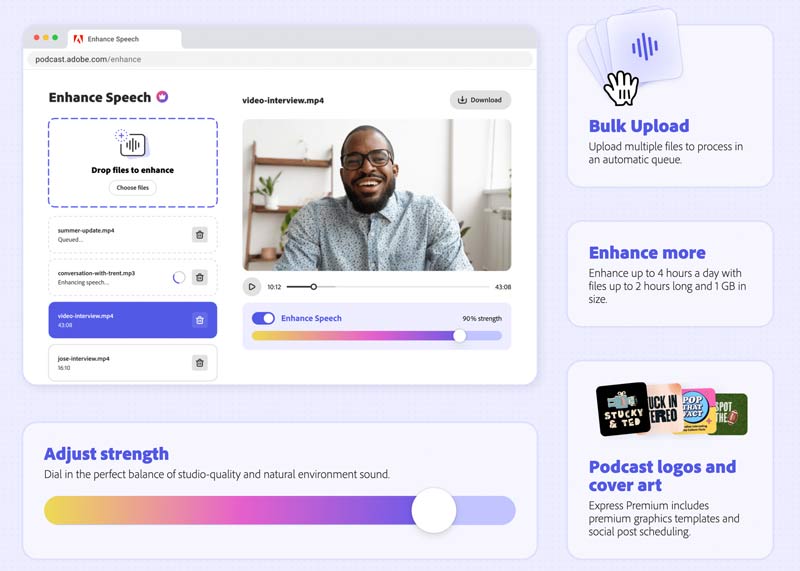
Ao pesquisar online por um corretor de áudio com inteligência artificial, você provavelmente encontrará a recomendação do Enhance Speech da Adobe. Este corretor de áudio com IA é usado principalmente para limpar o áudio e tornar suas gravações de voz mais profissionais. Você pode acessar o Enhance Speech pelo site do Adobe Podcasts e pelo software para desktop Adobe Express. O corretor de áudio com IA da Adobe identifica e remove automaticamente ruídos de fundo indesejados. Basta enviar sua gravação de áudio e deixar o Enhance Speech fazer o resto. Ele utiliza IA avançada para detectar melhor ruídos de trânsito, ruídos de microfone, zumbido de ar-condicionado e muito mais. Na versão gratuita, você só pode enviar um arquivo de áudio com menos de 30 minutos de duração e o tamanho máximo é de 500 MB. Para ultrapassar essas limitações, você pode optar por atualizar para o Adobe Express Premium.
Vantagens:
Desvantagens:
Ideal para: Criadores de conteúdo e educadores que precisam da maneira mais rápida possível de remover ruídos ambientes e normalizar o volume sem qualquer configuração técnica.
Ponto:4.5/5
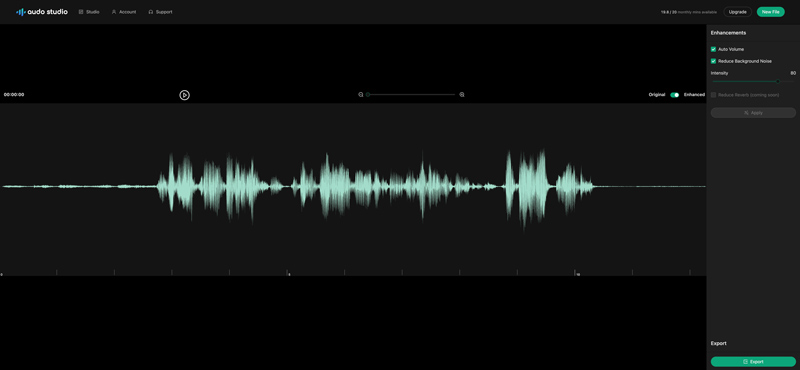
O Audo Studio é uma plataforma de IA baseada na web, usada principalmente para limpeza de áudio. Ele utiliza as mais recentes tecnologias de aprendizado de máquina e processamento de áudio para limpar seu áudio e melhorar sua qualidade. Este corretor de áudio com IA pode eliminar com eficácia diversos ruídos de fundo, como tráfego, vento, zumbido e muito mais. Além disso, ele ajusta automaticamente os níveis de volume para garantir o som mais agradável. A nova função de redução de eco será adicionada em breve à ferramenta de reparo de áudio. Ele oferece uma maneira simples de reparar áudio e aprimorar a qualidade. Todos os formatos de áudio mais comuns são suportados, incluindo MP3, M4A, WAV e FLAC. É necessário criar uma conta para usar este corretor de áudio com IA. Como novo usuário do Audo Studio, você recebe um tutorial em vídeo de 3 minutos para começar. Carregue seu arquivo de áudio, ative os recursos de aprimoramento e clique no botão Aplicar. Você pode pré-visualizar o áudio aprimorado e exportá-lo.
Vantagens:
Desvantagens:
Ideal para: Criadores de conteúdo para redes sociais e equipes de marketing que precisam aprimorar locuções e editar vídeos simultaneamente em alta velocidade.
Ponto:4.5/5
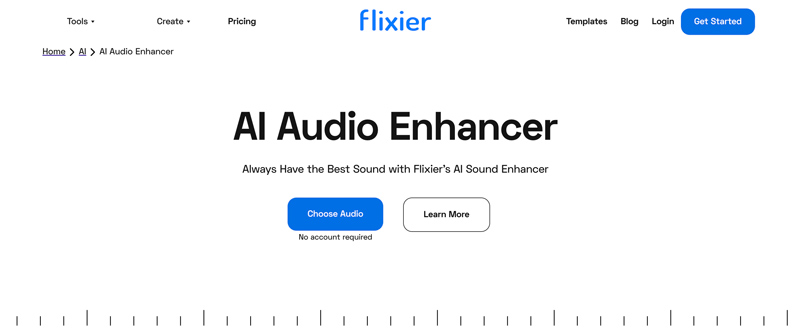
Flixier é uma plataforma completa de gravação, edição e criação de vídeo. Para reparo de áudio, possui um AI Audio Enhancer individual. Flixier afirma que combina a mais recente tecnologia de IA para garantir um resultado de aprimoramento de áudio de alta qualidade. Este fixador de áudio AI online pode ajudar remover ruído de fundocomo ruídos de trânsito, zumbidos e muito mais. Ele permite que você aprimore sua voz para diversas finalidades. Além disso, o AI Audio Enhancer pode ajustar automaticamente o volume para uma melhor experiência auditiva. Ele pode reparar áudio em todos os formatos comumente usados. Você pode corrigir áudio do seu dispositivo e de serviços em nuvem como Google Drive, Dropbox e OneDrive. Após fazer o upload do áudio, arraste-o para a linha do tempo e clique para selecioná-lo. Em seguida, você pode usar as opções oferecidas na seção Aprimorar Áudio para melhorar a qualidade do áudio.
Vantagens:
Desvantagens:
Ideal para: Criadores de conteúdo em geral e entusiastas que precisam de uma ferramenta rápida e offline para desktop para remover ruídos de fundo e melhorar a clareza dos diálogos em arquivos de áudio e vídeo.
Ponto:5/5
Aiseesoft Video Converter Ultimate é uma ferramenta multimídia versátil que combina conversão rápida de vídeo/áudio com recursos de aprimoramento de áudio baseados em IA. O software inclui ferramentas dedicadas como Removedor Vocal por IA, Isolador Vocal por IA, Amplificador de Volume, Compressor de Áudio e Sincronizador de Áudio para lidar com áudio. Além de corrigir o áudio e limpar faixas ruidosas, a IA pode realizar reconstrução de áudio generativa completa de forma inteligente.
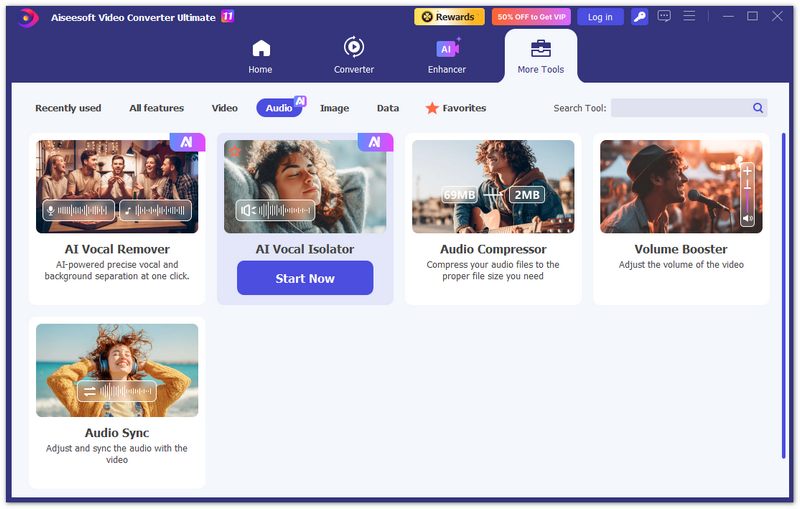
É excelente para remover ruídos de fundo, isolar vocais e melhorar a clareza de forma eficiente. Todas as operações são processadas localmente no seu computador, garantindo velocidade e privacidade. Isso o torna ideal para criadores que desejam uma limpeza de áudio rápida e confiável em vídeos ou arquivos de áudio independentes, sem depender de processamento em nuvem ou estações de trabalho de áudio digital (DAWs) complexas.
100% seguro. Sem anúncios.
100% seguro. Sem anúncios.
Vantagens:
Desvantagens:
Existe uma IA gratuita para aprimorar o áudio?
Sim, existem muitas ferramentas de edição e reparo de áudio de IA que podem ajudar a melhorar o áudio de graça. A maioria delas são ferramentas baseadas na web, como Flixier AI Audio Enhancer, Neural Love AI Enhance e Upscale Audio, Audioenhancer.ai Audio Enhancer, Adobe Podcast Enhance Speech e muito mais. Essas ferramentas online usam IA para melhorar a qualidade geral do som do seu arquivo de áudio. Esse processo de aprimoramento de áudio geralmente inclui a redução do ruído de fundo, a melhoria da clareza e o aumento da escala do áudio de baixa resolução. No entanto, você deve saber que algumas funções avançadas dessas ferramentas gratuitas de IA estão limitadas aos planos pagos.
O que diferencia um corretor de IA da redução de ruído?
O recurso AI Fixer utiliza inteligência artificial para aprimorar o áudio de forma inteligente, enquanto a Redução de Ruído apenas remove ruídos de fundo indesejados, sem melhorar a qualidade geral do áudio.
Você pode corrigir o áudio no Premiere Pro?
Sim. Adobe Premiere Pro oferece diversas funções e opções para reparar áudio e melhorar sua qualidade. Por exemplo, você pode contar com suas ferramentas de aprimoramento de áudio, como redução de ruído, ganho de áudio, equalizador e fala aprimorada, para melhorar toda a qualidade do áudio com facilidade. Além disso, permite ajustar alguns efeitos de áudio como EQ, Reverb e Delay para corrigir o áudio.
Conclusão
Embora a edição de áudio vá além de cortes, junções e mixagens básicas, a limpeza e a melhoria da qualidade do som são frequentemente necessárias. Este artigo recomenda 4 ferramentas confiáveis de correção de áudio para você escolher.
O melhor" Corretor de áudio AI Não é necessariamente aquele com mais recursos, mas sim aquele que se adapta ao seu fluxo de trabalho específico e às suas necessidades de privacidade. Para restauração vocal pura, o Adobe Podcast é a melhor opção, embora exija uma conexão de internet estável e possa ser caro para conteúdo de longa duração. Para privacidade e velocidade, o Aiseesoft Video Converter Ultimate se destaca por processar o áudio localmente na sua GPU, mantendo seus dados no computador e oferecendo resultados mais rápidos do que ferramentas baseadas em nuvem.
Criadores de conteúdo obtêm o melhor custo-benefício com o Flixier, que combina correção de áudio com poderosos recursos de edição de vídeo. Em 2026, não há motivo para se contentar com um áudio "bom o suficiente" - essas ferramentas de IA podem transformar uma gravação ruidosa de celular em uma obra-prima com qualidade de estúdio em segundos.
 O que é cancelamento de ruído - Fatos sobre cancelamento de ruído e mais
O que é cancelamento de ruído? Bem, milhões de usuários já têm dúvidas sobre esse assunto. Por esse motivo, criamos isso para você ler!
 Avaliação pontual do Music Mixer offline, online, aplicativos e dispositivos
Os mixers de música são softwares ou dispositivos que podem ajudá-lo a misturar sinais de áudio para torná-los perfeitos. Leia isto para saber mais sobre os mixers que você pode usar.
 Um guia para removedores vocais e as 7 principais escolhas para remover vocais
Qual é o melhor aplicativo de remoção de voz? Posso remover vozes de uma música online gratuitamente? O Audacity pode ser um removedor vocal? Confira as sete melhores ferramentas de remoção vocal.
O Video Converter Ultimate é um excelente conversor, editor e aprimorador de vídeo para converter, aprimorar e editar vídeos e músicas em 1000 formatos e muito mais.
100% seguro. Sem anúncios.
100% seguro. Sem anúncios.

*Campo obrigatório
*Por favor, insira um e-mail válido