How do you back up your Motorola phone?
This post gathers 5 easy ways to help you back up data from your Moto Razr Ultra, Edge, G Power/Play, G7/G6/G5/G4, Z3/Z2/Z Droid/Z Play, X4, and other Motorola phones.
Motorola is one of the famous brands of Android mobile phones throughout the world for its cost-effectiveness. Though the Moto mobile has been connected with Lenovo, it still enjoys a high reputation among lots of users. However, like other Android phones, Motorola is also suffering from data loss due to accidental deletion, factory reset, phone stolen/lost, root failure, etc.
Very annoyed when you encounter the data loss issue?
To solve the trouble thoroughly, you should back up Motorola frequently. This post aims to show you five standard methods to migrate your Motorola data to a PC, cloud, or another phone.
To help you quickly find the best method to back up your Motorola phone data, we have made an overview of the five backup methods. You can compare them and navigate the most suitable one based on your goal.
| Backup da Motorola | Local de backup | Dados Suportados | ferramenta | desvantagens |
| Backup e restauração de dados do Android | Computação | Contacts, messages, call logs, videos, audio, documents, and others | cabo USB, computador | As configurações do telefone não são salvas em backup |
| Motorola Migrate | Another Moto phone | Contatos, mensagens, fotos, vídeos, áudio, registros de chamadas, WhatsApp, documentos | cabo USB | O backup de telefone para telefone limita o armazenamento |
| FoneCopy - Transferência de telefone | Another phone (iOS & Android) | Contacts, photos, and other media files | cabo USB, computador | As configurações do telefone não são salvas em backup |
| Nuvem Verizon | Nuvem Verizon | Contacts, photos, videos, and documents | Wi-Fi e dados móveis | Apenas contatos são suportados para backup gratuitamente |
| Conta do Google | Google drive | Aplicativos, histórico de chamadas, configurações do dispositivo, contatos, calendário, SMS, fotos e vídeos | Wi-Fi, conta do Google | Google only offers limited free cloud storage |
Observe que o Motorola Device Manager is necessary for you to connect your Motorola phone or tablet to your computer using a USB cable. So you should download it to a Windows PC or Mac before you follow the steps below to make a Motorola backup on your computer.
In this way, you will need the data migration app, Backup e restauração de dados do Android, to help you. The software is specially designed to transform all types of files from an Android device, like your Motorola phone, to a Mac or PC directly.
Downloads
Backup e restauração de dados do Android
 100% seguro. Sem anúncios.
100% seguro. Sem anúncios.
If you want to copy the entire phone data from an older Motorola device running Android 5.1 Lollipop or older, you can use the Motorola Migrate app. Even though it is Motorola’s official data transfer app, its support was discontinued. The app can only be used to transfer files directly from one phone to another.
Ensure you have two compatible Motorola phones with Android 5.1 or below, and then use the Motorola Migrate app to back up data from one device to the other.
Download and open the app on both phones. It will display a QR code on the new phone. Select the specific file types you want to move to the old phone, and then use it to scan the QR code for the transfer.
When you get a new phone and want to move all the valuable data from your old Motorola phone to it, you come to the right place. The reputable FoneCopy - Transferência de telefone is what you will need exactly.
Transferência telefônica
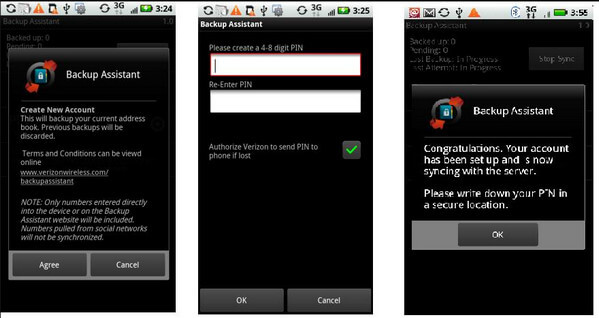
You can back up a Motorola phone to Nuvem Verizon using the official Verizon Cloud app. This cloud service allows you to back up contacts, messages, and photos.
Note that Verizon Cloud is a carrier-specific service. You must have an active Verizon Wireless account for it to work. What’s more, only the contacts storage is free.
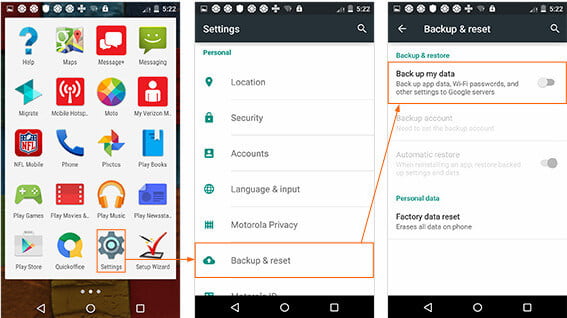
Ao trocar de telefone Motorola ou apagar seus dados, você pode usar a conta do Google para ajudá-lo a fazer backup e restaurar arquivos com conexão Wi-Fi.
As etapas são as seguintes.
Aqui, todas as 5 maneiras de fazer backup da Motorola foram compartilhadas aqui. Confira a melhor forma de você manter seu celular Motorola seguro.
Question 1: How do I back up my entire Motorola phone?
You can select a suitable method to back up your entire Motorola phone based on the specific data type you want to include, such as contacts, messages, photos, videos, apps, and settings. You can set up Google One Backup to automatically back up your Android phone data. If you want to manually back up selected files from your Motorola phone to a computer, the recommended Android Data Backup & Restore is a good choice.
Question 2: What is the best way to back up photos on my Motorola phone?
Google Photos is often considered the best way to back up photos and videos on an Android device, including your Motorola phone. It is naturally integrated and offers free storage for backing up. If you prefer cloud convenience, it can be the most convenient way to back up photos. However, if you want to create a physical copy on your computer, you can use a USB cable and file explorer.
Question 3: Are Motorola phones still around?
Yes, Motorola is actively releasing new phones across all price ranges. You can see several new devices launched in late 2025 and early 2026. It is a dynamic and evolving brand under Lenovo. Its new flagship products (Motorola Razr fold) are ambitiously expanding into the premium and innovative foldable markets.
Conclusão
Here, all the 5 ways to back up Motorola have been shared above. Check them and pick the best way based on your goal. The most seamless backup method is using Google’s built-in services, especially when you have a new Moto phone. Moreover, Google Photos is the best solution for automatic photo and video backup on your Android phone. For certain data types or easy restoration in the future, you need to use dedicated third-party apps like Backup e restauração de dados do Android.
 Faça backup dos dados do aplicativo Android com Helium e sua alternativa
O que é o aplicativo Hélio? Como usar o Helium para fazer backup dos dados do aplicativo no PC? Esta postagem mostrará como fazer backup ou sincronizar dados do Android com o Helium. Além disso, você pode encontrar a melhor alternativa de hélio aqui.
 Como fazer backup e restauração LG via nuvem/computador/outro telefone
Você realmente conhece o backup LG? Esta postagem fornece o guia completo de como fazer backup do telefone LG na nuvem, computador ou outro telefone e restaurar o backup facilmente a partir do backup.
 Samsung backup: faça backup do Samsung Galaxy S3/S4/S6/S7 nas nuvens
Quer fazer backup do seu Samsung Galaxy S3/S4/S6/S7, mas não tem ideia? Leia este artigo e aprenda algumas maneiras úteis de fazer backup da Samsung na nuvem ou no computador.
Fornece uma maneira simples de fazer backup e restaurar todos os tipos de arquivos, como contatos, mensagens, registros de chamadas, galeria, vídeos, áudio, etc. em seu dispositivo Android de forma segura e seletiva.
100% seguro. Sem anúncios.
100% seguro. Sem anúncios.

*Campo obrigatório
*Por favor, insira um e-mail válido